SEO content planner agent
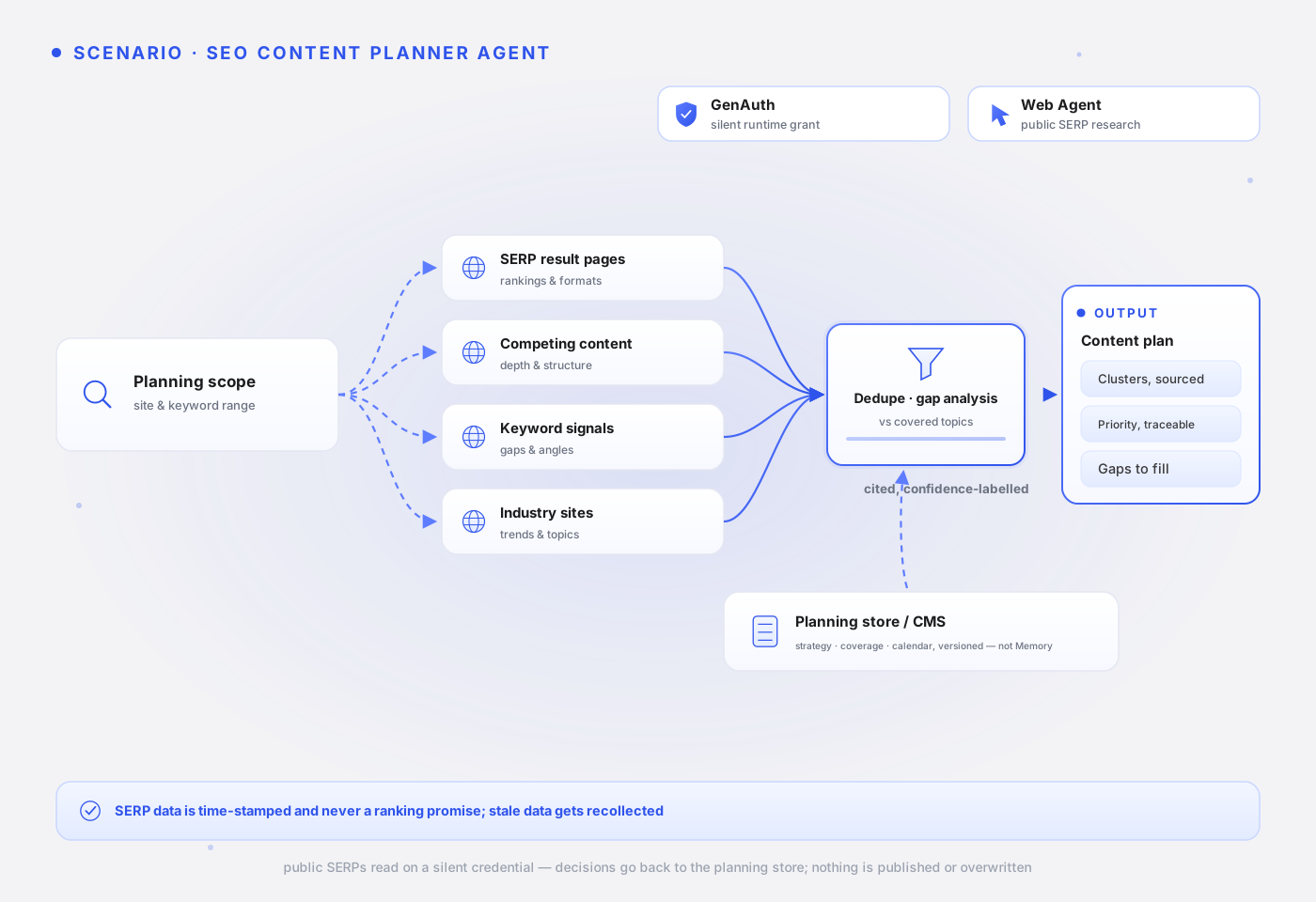
This page explains how an SEO content planner agent researches public SERPs and competing content, then generates a topic list and content briefs against the covered topics in your planning store. After reading it, you will understand why Web Agent is the core module here, why planning state lives in a planning store or CMS rather than Memory, and when interactive consent is actually needed.
Use case
Growth or content teams plan the next batch of content from public SERPs, competitor content, and the site's own planning state. SERPs and competitor content change constantly; manual consolidation misses already-covered topics and cannot keep up with competitor shifts — and every topic decision needs a data or page source behind it, or the content team cannot judge priority.
Typical triggers:
- A new quarter's content calendar kicks off, and a topic list must be produced from keyword gaps.
- Traffic drops for a keyword group, and competitor content must be researched to weigh update priority.
- The site enters a new topic area, and keyword gaps versus covered topics must be mapped.
Engineering challenges
- SERP data is highly time-sensitive: rankings and content formats shift weekly. Without a collection time, the plan is built on stale samples; and comparisons across keyword groups only hold when the samples come from similar collection windows.
- Planning state belongs to a system, not to memory: covered topics, the content calendar, and keyword strategy are team-shared structured state, updated by the publishing workflow. Putting them into personal memory decouples them from what the CMS actually published — which is exactly where duplicate and conflicting topics come from.
- The evidence chain: every priority call must trace back to a concrete SERP or data source, or the content team cannot judge whether to act and planning reviews cannot verify anything.
Module composition
| Module | Role | Notes |
|---|---|---|
| GenAuth | Core | Silent delegation issues the short-lived runtime credential every product call requires; interactive consent is only needed when login state or write actions enter the picture. |
| Web Agent | Core | Queries public SERPs and competing content via WebSearch, keeping a source URL and collection time per item. |
| GUMem | Not used | Keyword strategy, covered topics, and the content calendar are team-shared planning state, versioned in a planning store or CMS and updated by the publishing workflow; there is no personal memory worth persisting across sessions. |
When interactive consent is needed
Every product call requires a GenAuth delegate token; public read-only scenarios are covered by silent delegation. Public SERP research does not need per-task user consent — a silently issued runtime credential already provides the constraints this scenario needs: it is short-lived, revocable at any time, and every call carries a grantId and auditId for traceability.
Situations that require upgrading to mode: 'interactive' interactive consent, with explicit user confirmation in the Qoni Console:
- Signed-in access: the task needs data behind Search Console, analytics, or the CMS backend — not covered by this page's example; page-performance data is exported by your app and injected into the task instead.
- Write actions: publishing, overwriting, or deleting CMS content — excluded by default here; the topic list ships through the content team's review and publishing workflow.
Note: this sample requests webSearch, doAnything product permissions. Your application and downstream services must configure and enforce business limits such as queryable ranges. Product scopes and prompt rules do not enforce those detailed limits; this sample does not configure them. See Delegate token and attenuation.
Workflow
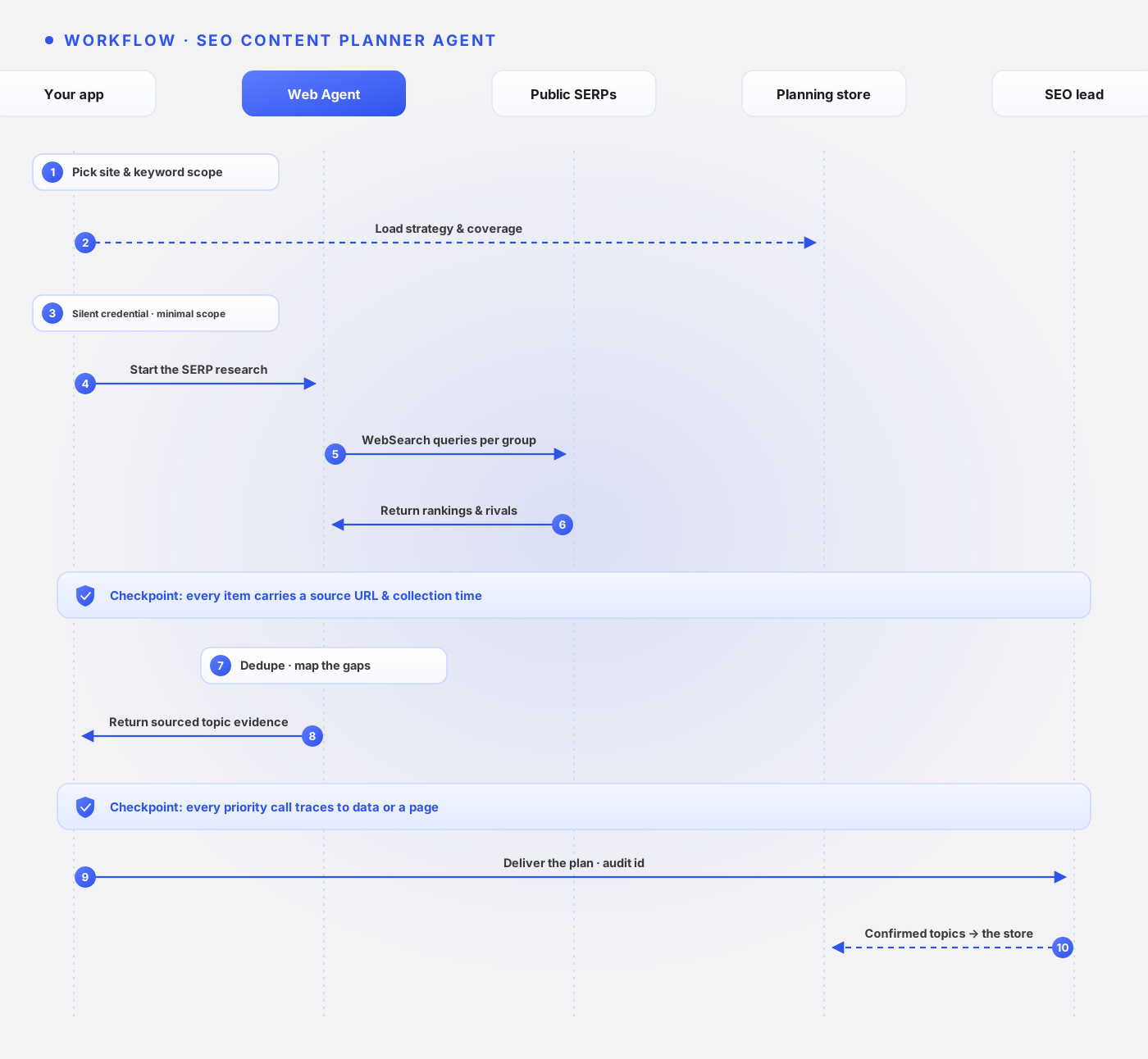
The user picks the site, topic, or keyword scope.
Your app loads the keyword strategy, covered topics, and content calendar (versioned) from the planning store or CMS, and obtains a silent runtime credential.
Web Agent queries public SERPs group by group via WebSearch, recording top-ranking pages, content angles, and a source URL and collection time per result.
Checkpoint: Every SERP item carries a source URL and collection time; cross-group comparisons only run on similar collection windows.
The Agent dedupes against covered topics, maps the gaps, and generates the topic list, content briefs, and priority suggestions.
Checkpoint: Every priority call traces back to concrete data or a page source; unsupported judgments never enter the deliverable.
The content team reviews the list; confirmed topics and calendar decisions are written back to the planning store or CMS as input for the next planning round.
Example code
This example uses @qoniai/qoni 0.9.0, published on npm. The download includes the same SDK version, installed with npm ci. The demo plans browser-privacy topics using Firefox official privacy information. The SDK reads real public pages; business inputs in scenarios.ts are labeled public-demo.
This demo does not read or write GUMem; its task uses the supplied page list and explicit business inputs. Web Search first supplies results[], which DoAnything then reads and analyzes. Supply your own JSON with --input; use --interactive when the user must consent to delegation. For site sign-in and user responses, see Qoni SDK.
Download the complete runnable examples, or run from the documentation repository:
cd examples/qoni
npm ci
npm run case -- seo-content-planner-agent
# Supply your own inputs
npm run case -- seo-content-planner-agent --input /path/to/input.json
Set server-side QONI_ACCESS_KEY and QONI_SECRET_KEY. QONI_USER_ID can identify your application's current GenAuth user; the local demo otherwise selects a user from the bound pool. Demonstration Memory writes use an isolated user rather than changing a business user's preferences.
This scenario's executable entry point:
import { cliOptions } from '../runtime.js'
import { inputFile, runScenario } from '../run-case.js'

// Propose content topics from actual search results and page evidence.
const report = await runScenario('seo-content-planner-agent', cliOptions(), inputFile())
// report.items: topics, search intent, and sources; it does not measure keyword volume.
// Validated fields: topic, searchIntent, sourceUrl.
console.log(JSON.stringify(report, null, 2))
The entry point loads the definition below by scenario ID. The code is included directly from scenarios.ts, with comments shown in the page language: the task, output fields, source field, Web Search queries (if any), whether Memory is used, and the demonstration input. The pipeline appends the input data, search sources, recalled Memory, and shared safety constraints to the task to build the final prompt; see the pipeline below for the full assembly.
// Propose content topics from actual search results and page evidence.
research('seo-content-planner-agent',
  'Use the search results and page content to propose two content topics about Firefox privacy. Return [{topic,searchIntent,sourceUrl}]. These are proposed topics, not measured keyword volume. Do not change any website or CMS.',
  ['topic','searchIntent','sourceUrl'], 'sourceUrl', ['Firefox privacy features Mozilla official'], sample([privacy], { approvedTopics:['browser privacy'], existingTopics:[] })),
The sample implements runScenario(), browser(), research(), and sample() as application functions. The pipeline below makes the actual SDK calls: delegation and introspection → required Memory/search → browser task or monitor → validation and saving. fields and sourceField define the application's output checks. The complete application helpers are in the package's runtime.ts.
Inspect the actual SDK pipeline
// browser() uses DoAnything; research() searches first; sample() labels public-demo inputs.
const firefox = 'https://www.mozilla.org/en-US/firefox/new/'
const manifesto = 'https://www.mozilla.org/en-US/about/manifesto/'
const privacy = 'https://www.mozilla.org/en-US/privacy/firefox/'
const support = 'https://support.mozilla.org/en-US/kb/get-started-firefox-overview-main-features'
// These copy rules become prompt context; server permissions and business checks remain separate.
const policy = {
  version: 'demo-2026-09',
  approvedClaims: ['Describe only features supported by the cited page.'],
  forbiddenClaims: ['guaranteed security', '100% private', 'unverified pricing or performance'],
  voice: 'concise and warm',
}
const sample = (pages: string[], business: JsonObject = {}): JsonObject => ({
  dataset: 'public-demo', pages, policy, business,
  notice: 'Business records are synthetic demonstration inputs. Referenced websites and SDK execution are real.',
})
// fields lists required output keys; sourceField identifies URL checks; memory enables GUMem calls.
const browser = (id: string, task: string, fields: string[], sourceField: string | undefined, input: JsonObject, memory = false): Scenario => ({
  id, products: ['doAnything'], task, fields, sourceField, input, memory,
})
const research = (id: string, task: string, fields: string[], sourceField: string, queries: string[], input: JsonObject, memory = false): Scenario => ({
  id, products: ['webSearch', 'doAnything'], task, fields, sourceField, queries, input, memory,
})import { QoniScopes, type JsonObject, type RunResult } from '@qoniai/qoni'
import { readFileSync } from 'node:fs'
import { getScenario, type Scenario } from './scenarios.js'
import { appendTrace, checkInputCoverage, cleanupDemoUser, createContext, delegate, handleInteraction, inputEntryCount, isolateDemoUser, object, readWithRetry, renderScreenshot,
save, saveArtifacts, searchHits, settled, settleRun, validateItems, withCleanup, type Context, type Options } from './runtime.js'
export async function runScenario(id: string, options: Options = {}, input?: JsonObject) {
// Load the task definition by ID; --input replaces its business inputs.
const scenario = getScenario(id)
const data = input ?? scenario.input
if (scenario.memory && data.dataset !== 'public-demo' && options.mode !== 'interactive' && !options.userId && !process.env.QONI_USER_ID) {
throw new Error('Business Memory writes require the current QONI_USER_ID; do not select an arbitrary bound user')
}
const context = await createContext(id, { ...options,
skipUserResolution: scenario.memory && data.dataset === 'public-demo' })
return withCleanup(context, async register => {
register('isolated demonstration user', () => cleanupDemoUser(context))
// Isolate demo preferences; business Memory belongs to the identified current user.
if (scenario.memory && data.dataset === 'public-demo') await isolateDemoUser(context)
return await executeScenario(context, scenario, data)
})
}
export async function executeScenario(context: Context, scenario: Scenario, input: JsonObject) {
const pages = input.pages
if (!Array.isArray(pages) || !pages.length || pages.some(page => typeof page !== 'string' || !/^https:\/\//.test(page))) {
throw new Error('Input pages must be an array of HTTPS URLs')
}
if (input.requiresLogin === true && context.mode !== 'interactive') {
throw new Error('Targets that require sign-in need --interactive and user-controlled login')
}
const memoryScopes = scenario.memory
? [QoniScopes.GUMEM_MEMORY_READ, QoniScopes.GUMEM_MEMORY_WRITE, QoniScopes.GUMEM_MESSAGE_WRITE] : []
// delegate() is an application helper around the SDK delegation methods.
const grant = await delegate(context, scenario.id, scenario.products, memoryScopes)
// Read the effective scopes; readWithRetry() retries only retryable read failures.
const { data: tokenInfo } = await readWithRetry(context, 'delegation introspection',
() => context.qoni.genauth.introspectDelegationToken({ token: grant.token }))
const info = object(tokenInfo)
if (info.active !== true) throw new Error('The delegation token is not active')
const audit = { grantId: grant.grantId, auditId: grant.auditId, scopes: info.scope }
let memory: unknown
if (scenario.memory) {
// A Session associates this conversation with the user; the app chooses sessionId.
const sessionId = `${scenario.id}-${Date.now()}`
await context.qoni.gumem.createSession({
token: grant.token, userId: context.userId, sessionId, title: scenario.id,
})
const preferences = object(input.business ?? {}).confirmedPreferences
if (Array.isArray(preferences) && preferences.length) {
// Store confirmed preferences only; sync: true requests synchronous processing.
await context.qoni.gumem.addMessages({ token: grant.token, userId: context.userId, sessionId, sync: true,
messages: [{ role: 'user', content: `Confirmed demonstration preferences: ${preferences.join('; ')}` }] })
}
// Recall relevant preferences for the later task prompt.
memory = (await readWithRetry(context, 'GUMem recall', () => context.qoni.gumem.recall({ token: grant.token, sessionId,
query: 'Confirmed preferences relevant to this task', details: true }))).data
save(context, 'memory.json', { sessionId, context: memory })
if (Array.isArray(preferences) && preferences.length && !preferences.every(value => JSON.stringify(memory).includes(String(value)))) {
throw new Error('Recall did not include the confirmed preferences just written by this demo')
}
}
if (scenario.products.includes('track')) return runMonitor(context, scenario, input, grant.token, audit)
let hits: ReturnType<typeof searchHits> = []
if (scenario.queries) {
// Web Search returns results[]; DoAnything receives these sources to inspect.
const search = await context.qoni.webSearch.run({ token: grant.token, prompt: scenario.queries, maxResultsPerQuery: 3 })
save(context, 'search-ref.json', { runId: search.id, audit })
await withCleanup(context, async register => {
register('Web Search run', () => search.cancel('Documentation demonstration cleanup'))
const result = await settleRun(context, search)
save(context, 'search-result.json', result)
settled(result)
hits = searchHits(result.output)
})
}
// One-per-entry scenarios request exactly one item per input entry; others at most two.
const requiredItems = inputEntryCount(scenario.id, input)
// Assemble the task, inputs, search sources, and Memory as application-defined context.
const prompt = [scenario.task, `Task inputs: ${JSON.stringify(input)}`,
`Search sources: ${JSON.stringify(hits)}`, `Confirmed memory: ${JSON.stringify(memory ?? null)}`,
`Actual collection time: ${new Date().toISOString()}`,
requiredItems === undefined
? 'Inspect the supplied sources. Return at most two items in the requested JSON array, without prose or Markdown.'
: `Inspect the supplied sources. Return exactly ${requiredItems} item${requiredItems === 1 ? '' : 's'} in the requested JSON array, one per input entry, without prose or Markdown.`,
'Keep synthetic demonstration data identified as synthetic. Do not send messages, publish, pay, edit accounts or submit forms.',
input.requiresLogin === true ? 'Request user sign-in through an interaction when required; never enter credentials yourself.' : 'Public demonstration sources only; do not sign in.',
].join('\n\n')
// Start the Agent with this grant; capture receives delivered screenshots, not every step.
const run = await context.qoni.doAnything.run({ token: grant.token, prompt, capture: { screenshots: true } })
save(context, 'run-ref.json', { runId: run.id, session: run.sessionRef, audit })
let result: RunResult
const trace = (event: { type: string; data: unknown }) => {
context.eventCounts[event.type] = (context.eventCounts[event.type] ?? 0) + 1
if (['progress','message','done'].includes(event.type)) appendTrace(context, event)
if (event.type === 'browserLiveUrlChanged') {
const liveUrl = object(event.data).liveUrl
if (typeof liveUrl === 'string') context.browserUrl = liveUrl
}
}
return withCleanup(context, async register => {
register('DoAnything run', () => run.cancel('Documentation demonstration cleanup'))
if (context.delivery === 'events') {
// --events streams updates; wrap interaction data in an SDK handle for user handling.
for await (const event of run.events({ signal: AbortSignal.any([context.abort.signal, AbortSignal.timeout(context.timeoutMs)]) })) {
trace(event)
if (event.type === 'screenshot') renderScreenshot(context, event.image)
if (event.type === 'interaction') await handleInteraction(context, run.interactionHandle(event.data))
}
result = await settleRun(context, run)
} else {
// Callback mode receives this run's events inside wait; helpers save images and ask the user.
result = await settleRun(context, run, { onEvent: trace,
onScreenshot: (image, index) => renderScreenshot(context, image, index),
onInteraction: interaction => handleInteraction(context, interaction) })
}
save(context, 'result.json', result)
settled(result)
await saveArtifacts(context, result)
if (scenario.id === 'landing-page-audit-agent' && context.screenshots === 0) throw new Error('The landing-page audit did not deliver the requested screenshot')
// The app checks required fields and source URL formats; a reviewer still checks facts.
const items = validateItems(result.output, scenario.fields, scenario.sourceField)
// Scenarios that require one item per input entry are checked against the input.
checkInputCoverage(scenario.id, items, input)
const report = { scenario: scenario.id, dataset: input.dataset, passed: true, runId: run.id,
status: result.status, items, audit, screenshots: context.screenshots, interactions: context.interactions,
events: context.eventCounts, artifactIds: result.artifacts.map(artifact => artifact.id) }
save(context, 'report.json', report)
return report
})
}
async function runMonitor(context: Context, scenario: Scenario, input: JsonObject, token: string, audit: JsonObject) {
// Track creates a monitor with targets, extraction fields, and hourly scheduling.
const monitor = await context.qoni.track.create({ token, prompt: scenario.task,
targetUrls: input.pages, extractionSchema: { heading: 'string', source_url: 'string' },
tickInstructions: `Open the target URLs and read the actual visible heading. Return a JSON object with heading and source_url. ${scenario.task}`,
triggerDsl: { on: 'change' }, schedule: { kind: 'interval', intervalSeconds: 3600 } })
save(context, 'monitor-ref.json', { id: monitor.id, audit })
return withCleanup(context, async register => {
register('Track monitor', () => monitor.delete())
const definition = await monitor.get()
save(context, 'monitor-definition.json', definition)
if (object(definition.schedule).intervalSeconds !== 3600) throw new Error('Track did not persist the requested schedule interval')
// Run one tick and inspect its extraction by runId; completed alone does not prove success.
const tick = await monitor.runNow()
save(context, 'tick.json', tick)
if (tick.state !== 'completed') throw new Error(`Track execution failed: ${tick.state} / ${tick.error ?? ''}`)
const runId = tick.runId
if (typeof runId !== 'string') throw new Error('Track tick did not return a runId')
const detail = await monitor.run(runId)
save(context, 'tick-detail.json', detail)
if (detail.state !== 'completed' || !detail.extracted || !Object.keys(object(detail.extracted)).length) {
throw new Error('Track did not extract page data')
}
const extracted = object(detail.extracted)
if (typeof extracted.heading !== 'string' || !extracted.heading.trim() ||
typeof extracted.source_url !== 'string' || !/^https:\/\//.test(extracted.source_url)) {
throw new Error('Track extraction is missing a heading or source URL')
}
const normalizeUrl = (value: string) => { const url = new URL(value); url.hash = ''; return url.href.replace(/\/$/, '') }
if (!(input.pages as string[]).some(url => normalizeUrl(url) === normalizeUrl(String(extracted.source_url)))) {
throw new Error('The Track source URL is not a configured target')
}
// Check persisted pause/resume state; withCleanup() deletes the monitor on exit.
await monitor.pause()
if ((await monitor.get()).status !== 'paused') throw new Error('Track did not persist the paused state')
await monitor.resume()
if ((await monitor.get()).status !== 'active') throw new Error('Track did not persist the active state')
const report = { scenario: scenario.id, dataset: input.dataset, passed: true, monitorId: monitor.id,
runId, state: detail.state, outcome: detail.outcome, extracted: detail.extracted, audit }
save(context, 'report.json', report)
return report
})
}
export function inputFile(): JsonObject | undefined {
const index = process.argv.indexOf('--input')
return index >= 0 ? object(JSON.parse(readFileSync(process.argv[index + 1], 'utf8'))) : undefined
}Results are written to output/seo-content-planner-agent/report.json. report.items contains topics, search intent, and sources; it does not measure keyword volume, with fields topic, searchIntent, sourceUrl. audit links the grant ID, audit ID, and effective scopes; http.json records redacted request statuses. The application parses DoAnything output and checks required fields and source URL formats. A business reviewer still assesses the content against the original sources.
Data and memory boundaries
This scenario touches four kinds of data; none of them belongs in GUMem:
- Planning state: keyword strategy, covered topics, and the content calendar — team-shared structured state, versioned in a planning store or CMS, injected at task time, with confirmed topic decisions written back there.
- Business state: topic lists, content briefs, and SERP collection samples — archived for planning review and verification.
- Audit records: the delegation and behavior chain formed by
grantIdandauditId— maintained by GenAuth. - User Memory: not used in this scenario. If an individual editor's preferences (say, brief-writing tone) ever need persisting, that is where GUMem fits; team-shared planning state is not personal memory.
Failure handling
| Situation | Recommended handling |
|---|---|
| SERP results are unstable or collection fails | Treat it as a failure and record the collection time; never draw trend conclusions from incomplete samples. |
| Collection windows diverge too much across keyword groups | Re-collect to align the windows before comparing; never mix old and new samples. |
| An output entry lacks a source or collection time | App-side validation drops the entry and the list notes how many were dropped. |
| Analytics data behind a sign-in is needed | This task does not access it; export and inject it from your app, or start a separate interactive delegation. |
Production notes
Never auto-publish or overwrite CMS content: the topic list ships through the content team's review and publishing workflow. Keep the source and collection time on ranking and competitor data; SERP data is time-sensitive, and samples past a reasonable window should be re-collected rather than reused. Topics and priorities are suggestions based on current data — never promise ranking outcomes.
Next steps
- Read the Quickstart to run the shortest path for Agent identity and delegation.
- Read WebSearch for how public SERP queries work.
- Continue with the Campaign brief agent for an adjacent scenario.