招聘寻源智能体
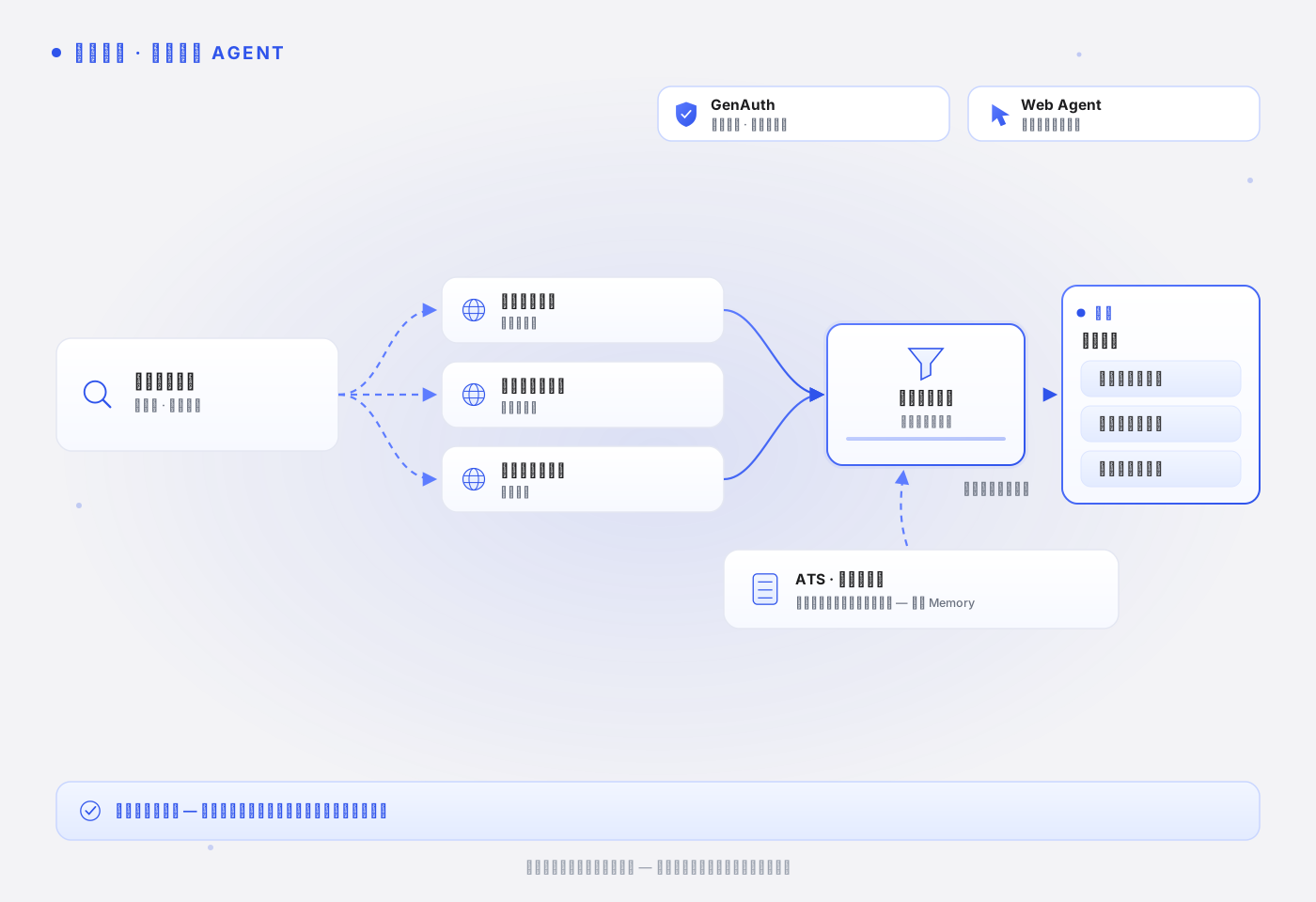
本页说明招聘寻源智能体如何按经审核的岗位能力要求检索候选人公开资料,生成每条匹配理由都带来源的寻源清单。读完本页,你能理解这个场景为什么以 Web Agent 为核心、岗位规则为什么放在 ATS 或规则库而不是 Memory,以及候选人评估中偏见风险的工程处理方式。
适用场景
招聘团队需要根据职位要求查找公开候选人资料并生成候选人摘要。公开资料分散在个人主页、技术社区和公开履历页上,人工逐个检索既慢又难保持标准一致;直接把招聘系统账号交给脚本,则候选人数据的访问和留存完全失控。Agent 只处理公开可见的信息,产出是待招聘人员复核的寻源清单。
典型触发时机:
- 新职位开放,需要在几天内产出首批候选人寻源清单。
- 职位要求调整后,需要按新标准重新筛选已有候选池。
- 稀缺岗位长期在招,需要定期补充新出现的公开候选人线索。
工程挑战
- 公开信息的采集边界:候选人资料散在个人主页、社区和作品集上,哪些真正公开、哪些要登录才可见,这条边界必须硬性执行——绕过登录墙采集候选人数据是合规事故,不是技术优化。
- 筛选口径漂移与偏见固化:寻源标准如果由脚本各自理解 JD,跨批次结果无法对齐;而用"历史上哪类人进了面试"来校准标准,会把过去的偏见固化成排序信号。口径必须来自经审核、版本化的岗位能力要求,不来自历史推进结果。
- 证据与可复核性:每条匹配理由必须对应具体公开来源和抓取时间,招聘人员才能复核;无来源的"感觉匹配"既不可审计也不可辩护。
模块组合
| 模块 | 角色 | 说明 |
|---|---|---|
| GenAuth | 核心 | 运行时以静默委托签发短时效凭证(所有产品调用必需):短时效、可撤销、带审计记录;本场景默认无需交互式确认,需要登录 ATS 或招聘系统时才升级为交互式委托。 |
| Web Agent | 核心 | 通过 WebSearch 检索公开候选人资料,逐条保留来源 URL 与抓取时间;登录才可见的页面跳过并记录。 |
| GUMem | 不使用 | 岗位能力要求是经审核、版本化的招聘规则,放在 ATS 或规则库按版本注入;历史面试推进结果不得作为候选人排序信号,因此不存在需要跨会话沉淀的"筛选偏好记忆"。 |
何时需要交互式确认
所有产品调用都必须持有 GenAuth 签发的委托令牌——可选的不是委托本身,而是交互式确认。公开候选人资料检索不需要用户逐次确认授权:静默签发的运行时凭证已经提供这个场景需要的约束——凭证短时效、可随时撤销、每次检索都带 grantId 与 auditId 可归因到具体职位和任务。
需要升级为 mode: 'interactive' 交互式委托、让招聘人员在 Qoni Console 明确确认的情况:
- 登录态访问:任务需要进入 ATS、招聘系统或其他登录后才可见的候选人数据——本页示例不涉及。
- 写动作:私信候选人、修改候选池——本场景默认排除,建联始终由招聘人员确认草稿后由人执行。
注意:本样例申请 webSearch、doAnything 产品权限。可检索的站点清单等业务边界需要由应用和下游服务配置、校验;产品 scope 和 prompt 中的规则不提供这些细粒度限制。本样例未展示该配置。授权语义见 Delegate Token 与缩权。
工作流程
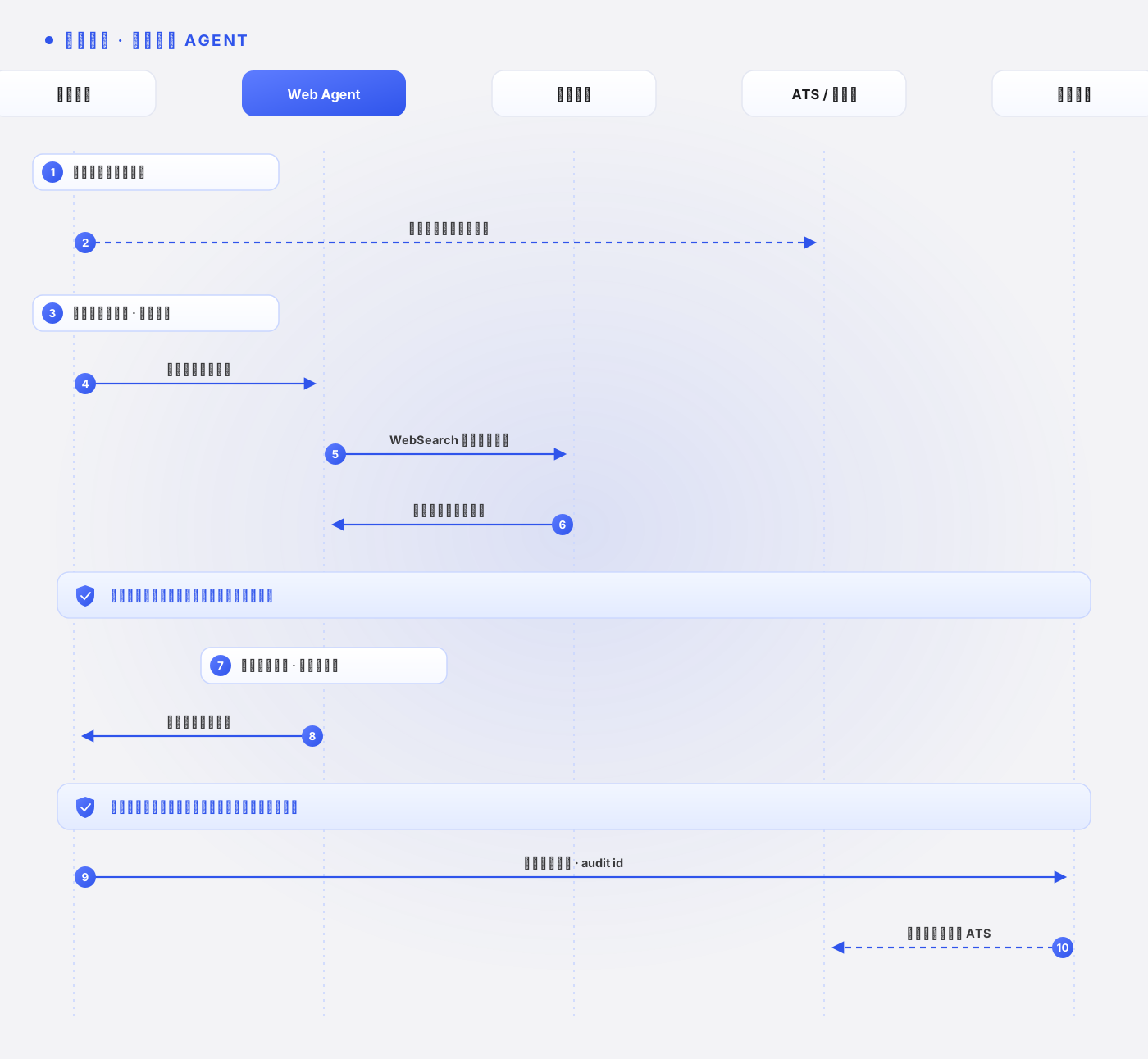
招聘人员选择职位并确认寻源范围。
应用从 ATS 或规则库读取经审核的岗位能力要求(带版本号),并获取静默运行时凭证。
Web Agent 检索公开候选人资料,逐条抽取经历、技能和公开作品,保留来源 URL 和抓取时间。
检查点:只采集公开可见信息;遇到需要登录才可见的候选人页面,跳过并记录,不尝试绕过。
Agent 按岗位能力要求生成候选人摘要和匹配理由,每条理由对应具体来源并引用规则版本号。
检查点:摘要中不得出现敏感属性(年龄、婚育、族裔等)或与岗位能力无关的信号;发现即剔除并记录。历史面试推进结果不参与排序。
招聘人员复核清单,标注推进或排除;复核结果记录到 ATS,用于岗位规则的下一次人工修订评审。
需要建联时,Agent 生成私信草稿交招聘人员确认后由人发送,不自动触达候选人。
示例代码
本页使用已发布到 npm 的 @qoniai/qoni 0.9.0;下载包附带同版本 SDK,由 npm ci 安装。默认研究 Mozilla 公开领导者资料,岗位与筛选条件均为演示输入。公开网页由真实 SDK 读取,业务输入在 scenarios.ts 中标记为 public-demo。
本演示不读取或写入 GUMem;任务输入来自页面清单和明确提供的业务数据。Web Search 先取得 results[] 来源,再由 DoAnything 阅读和分析。接入自己的数据时,用 --input 指定 JSON 文件;需要用户同意时用 --interactive 发起委托,站点登录与交互处理见 Qoni SDK。
下载完整可运行样例,或在文档仓库中执行:
cd examples/qoni
npm ci
npm run case -- recruiting-sourcing-agent
# 使用自己的输入
npm run case -- recruiting-sourcing-agent --input /path/to/input.json
运行前设置服务端 QONI_ACCESS_KEY、QONI_SECRET_KEY。QONI_USER_ID 可指定业务已识别的 GenAuth 用户;未指定时,本地演示从绑定用户池取用户。涉及演示 Memory 写入时,程序创建独立用户以避免修改业务用户的偏好。
本场景的真实执行入口:
import { cliOptions } from '../runtime.js'
import { inputFile, runScenario } from '../run-case.js'

// 依据公开职业证据生成候选人研究草稿。
const report = await runScenario('recruiting-sourcing-agent', cliOptions(), inputFile())
// report.items:姓名、证据和来源,供招聘人员复核。
// 校验字段:name, evidence, sourceUrl.
console.log(JSON.stringify(report, null, 2))
入口按场景 ID 读取下面这段定义,代码直接引用实际执行的 scenarios.ts,注释按页面语言显示:任务描述、输出字段、来源字段、Web Search 查询(如有)、是否使用 Memory,以及演示输入。执行链会在任务描述后追加输入数据、搜索来源、召回的 Memory 和通用安全约束,拼成最终的任务描述,完整拼装逻辑见下方执行链。
// 依据公开职业证据生成候选人研究草稿。
research('recruiting-sourcing-agent',
  'Use public professional information to prepare a candidate-research draft for the synthetic role. Return [{name,evidence,sourceUrl}]. Evidence must be visible in the public sources. Do not infer protected traits, collect private contacts, contact anyone or make a hiring decision.',
  ['name','evidence','sourceUrl'], 'sourceUrl', ['Mozilla public leadership professional biography'], sample(['https://www.mozilla.org/en-US/about/leadership/'], { roleId:'demo-open-web-role',approvedCriteria:['Public browser-industry experience'] })),
这里的 runScenario()、browser()、research() 和 sample() 是样例包的应用函数。实际 SDK 调用都在下面的执行链中:委托与权限查询 → 所需的 Memory/搜索 → 网页任务或监控 → 校验与保存。fields、sourceField 规定本场景如何校验业务输出;它们由应用使用。辅助函数的完整实现在样例包的 runtime.ts 中。
查看实际 SDK 执行链
// 场景构造器:browser() 只调用 DoAnything;research() 先 Web Search 再 DoAnything;sample() 标记 public-demo 演示输入。
const firefox = 'https://www.mozilla.org/en-US/firefox/new/'
const manifesto = 'https://www.mozilla.org/en-US/about/manifesto/'
const privacy = 'https://www.mozilla.org/en-US/privacy/firefox/'
const support = 'https://support.mozilla.org/en-US/kb/get-started-firefox-overview-main-features'
// 演示文案规则会加入 prompt;它们不替代服务端权限或业务规则校验。
const policy = {
  version: 'demo-2026-09',
  approvedClaims: ['Describe only features supported by the cited page.'],
  forbiddenClaims: ['guaranteed security', '100% private', 'unverified pricing or performance'],
  voice: 'concise and warm',
}
const sample = (pages: string[], business: JsonObject = {}): JsonObject => ({
  dataset: 'public-demo', pages, policy, business,
  notice: 'Business records are synthetic demonstration inputs. Referenced websites and SDK execution are real.',
})
// fields 是必填输出字段;sourceField 指定需要校验 URL 格式的字段,memory 控制是否调用 GUMem。
const browser = (id: string, task: string, fields: string[], sourceField: string | undefined, input: JsonObject, memory = false): Scenario => ({
  id, products: ['doAnything'], task, fields, sourceField, input, memory,
})
const research = (id: string, task: string, fields: string[], sourceField: string, queries: string[], input: JsonObject, memory = false): Scenario => ({
  id, products: ['webSearch', 'doAnything'], task, fields, sourceField, queries, input, memory,
})import { QoniScopes, type JsonObject, type RunResult } from '@qoniai/qoni'
import { readFileSync } from 'node:fs'
import { getScenario, type Scenario } from './scenarios.js'
import { appendTrace, checkInputCoverage, cleanupDemoUser, createContext, delegate, handleInteraction, inputEntryCount, isolateDemoUser, object, readWithRetry, renderScreenshot,
save, saveArtifacts, searchHits, settled, settleRun, validateItems, withCleanup, type Context, type Options } from './runtime.js'
export async function runScenario(id: string, options: Options = {}, input?: JsonObject) {
// 按场景 ID 读取真实任务定义;--input 只替换业务输入。
const scenario = getScenario(id)
const data = input ?? scenario.input
if (scenario.memory && data.dataset !== 'public-demo' && options.mode !== 'interactive' && !options.userId && !process.env.QONI_USER_ID) {
throw new Error('Business Memory writes require the current QONI_USER_ID; do not select an arbitrary bound user')
}
const context = await createContext(id, { ...options,
skipUserResolution: scenario.memory && data.dataset === 'public-demo' })
return withCleanup(context, async register => {
register('isolated demonstration user', () => cleanupDemoUser(context))
// 演示偏好写入隔离用户;业务 Memory 必须属于明确识别的当前用户。
if (scenario.memory && data.dataset === 'public-demo') await isolateDemoUser(context)
return await executeScenario(context, scenario, data)
})
}
export async function executeScenario(context: Context, scenario: Scenario, input: JsonObject) {
const pages = input.pages
if (!Array.isArray(pages) || !pages.length || pages.some(page => typeof page !== 'string' || !/^https:\/\//.test(page))) {
throw new Error('Input pages must be an array of HTTPS URLs')
}
if (input.requiresLogin === true && context.mode !== 'interactive') {
throw new Error('Targets that require sign-in need --interactive and user-controlled login')
}
const memoryScopes = scenario.memory
? [QoniScopes.GUMEM_MEMORY_READ, QoniScopes.GUMEM_MEMORY_WRITE, QoniScopes.GUMEM_MESSAGE_WRITE] : []
// delegate() 是应用函数,内部调用 delegateToken / completeDelegateToken。
const grant = await delegate(context, scenario.id, scenario.products, memoryScopes)
// 查询实际授权范围;readWithRetry() 只对可重试的读取错误有限重试。
const { data: tokenInfo } = await readWithRetry(context, 'delegation introspection',
() => context.qoni.genauth.introspectDelegationToken({ token: grant.token }))
const info = object(tokenInfo)
if (info.active !== true) throw new Error('The delegation token is not active')
const audit = { grantId: grant.grantId, auditId: grant.auditId, scopes: info.scope }
let memory: unknown
if (scenario.memory) {
// Session 将本次对话关联到当前用户,sessionId 由应用生成。
const sessionId = `${scenario.id}-${Date.now()}`
await context.qoni.gumem.createSession({
token: grant.token, userId: context.userId, sessionId, title: scenario.id,
})
const preferences = object(input.business ?? {}).confirmedPreferences
if (Array.isArray(preferences) && preferences.length) {
// 只写入业务已经确认的偏好;sync: true 请求同步处理这次写入。
await context.qoni.gumem.addMessages({ token: grant.token, userId: context.userId, sessionId, sync: true,
messages: [{ role: 'user', content: `Confirmed demonstration preferences: ${preferences.join('; ')}` }] })
}
// 召回与任务有关的偏好,作为后续 prompt 的上下文。
memory = (await readWithRetry(context, 'GUMem recall', () => context.qoni.gumem.recall({ token: grant.token, sessionId,
query: 'Confirmed preferences relevant to this task', details: true }))).data
save(context, 'memory.json', { sessionId, context: memory })
if (Array.isArray(preferences) && preferences.length && !preferences.every(value => JSON.stringify(memory).includes(String(value)))) {
throw new Error('Recall did not include the confirmed preferences just written by this demo')
}
}
if (scenario.products.includes('track')) return runMonitor(context, scenario, input, grant.token, audit)
let hits: ReturnType<typeof searchHits> = []
if (scenario.queries) {
// Web Search 返回真实 results[];搜索来源将提供给 DoAnything 阅读。
const search = await context.qoni.webSearch.run({ token: grant.token, prompt: scenario.queries, maxResultsPerQuery: 3 })
save(context, 'search-ref.json', { runId: search.id, audit })
await withCleanup(context, async register => {
register('Web Search run', () => search.cancel('Documentation demonstration cleanup'))
const result = await settleRun(context, search)
save(context, 'search-result.json', result)
settled(result)
hits = searchHits(result.output)
})
}
// 逐项对应输入的场景按输入项数要求条数,其余场景最多两项。
const requiredItems = inputEntryCount(scenario.id, input)
// 拼装场景任务、业务输入、搜索来源和 Memory;这些都是应用约定的上下文。
const prompt = [scenario.task, `Task inputs: ${JSON.stringify(input)}`,
`Search sources: ${JSON.stringify(hits)}`, `Confirmed memory: ${JSON.stringify(memory ?? null)}`,
`Actual collection time: ${new Date().toISOString()}`,
requiredItems === undefined
? 'Inspect the supplied sources. Return at most two items in the requested JSON array, without prose or Markdown.'
: `Inspect the supplied sources. Return exactly ${requiredItems} item${requiredItems === 1 ? '' : 's'} in the requested JSON array, one per input entry, without prose or Markdown.`,
'Keep synthetic demonstration data identified as synthetic. Do not send messages, publish, pay, edit accounts or submit forms.',
input.requiresLogin === true ? 'Request user sign-in through an interaction when required; never enter credentials yourself.' : 'Public demonstration sources only; do not sign in.',
].join('\n\n')
// 使用同一委托启动 Agent;capture 接收服务端交付的截图,不保证每步都有图。
const run = await context.qoni.doAnything.run({ token: grant.token, prompt, capture: { screenshots: true } })
save(context, 'run-ref.json', { runId: run.id, session: run.sessionRef, audit })
let result: RunResult
const trace = (event: { type: string; data: unknown }) => {
context.eventCounts[event.type] = (context.eventCounts[event.type] ?? 0) + 1
if (['progress','message','done'].includes(event.type)) appendTrace(context, event)
if (event.type === 'browserLiveUrlChanged') {
const liveUrl = object(event.data).liveUrl
if (typeof liveUrl === 'string') context.browserUrl = liveUrl
}
}
return withCleanup(context, async register => {
register('DoAnything run', () => run.cancel('Documentation demonstration cleanup'))
if (context.delivery === 'events') {
// --events 实时读取事件;普通交互对象先转换为 SDK 句柄再交给用户处理。
for await (const event of run.events({ signal: AbortSignal.any([context.abort.signal, AbortSignal.timeout(context.timeoutMs)]) })) {
trace(event)
if (event.type === 'screenshot') renderScreenshot(context, event.image)
if (event.type === 'interaction') await handleInteraction(context, run.interactionHandle(event.data))
}
result = await settleRun(context, run)
} else {
// 回调模式在 wait 内接收同一次任务的事件;这里的辅助函数会保存图像和询问用户。
result = await settleRun(context, run, { onEvent: trace,
onScreenshot: (image, index) => renderScreenshot(context, image, index),
onInteraction: interaction => handleInteraction(context, interaction) })
}
save(context, 'result.json', result)
settled(result)
await saveArtifacts(context, result)
if (scenario.id === 'landing-page-audit-agent' && context.screenshots === 0) throw new Error('The landing-page audit did not deliver the requested screenshot')
// 应用校验必填字段和来源 URL 格式;事实准确性仍需业务复核。
const items = validateItems(result.output, scenario.fields, scenario.sourceField)
// 要求逐项对应输入的场景,再核对每个输入项都有对应输出。
checkInputCoverage(scenario.id, items, input)
const report = { scenario: scenario.id, dataset: input.dataset, passed: true, runId: run.id,
status: result.status, items, audit, screenshots: context.screenshots, interactions: context.interactions,
events: context.eventCounts, artifactIds: result.artifacts.map(artifact => artifact.id) }
save(context, 'report.json', report)
return report
})
}
async function runMonitor(context: Context, scenario: Scenario, input: JsonObject, token: string, audit: JsonObject) {
// Track 单独创建 monitor:声明目标、抽取字段并请求每小时调度。
const monitor = await context.qoni.track.create({ token, prompt: scenario.task,
targetUrls: input.pages, extractionSchema: { heading: 'string', source_url: 'string' },
tickInstructions: `Open the target URLs and read the actual visible heading. Return a JSON object with heading and source_url. ${scenario.task}`,
triggerDsl: { on: 'change' }, schedule: { kind: 'interval', intervalSeconds: 3600 } })
save(context, 'monitor-ref.json', { id: monitor.id, audit })
return withCleanup(context, async register => {
register('Track monitor', () => monitor.delete())
const definition = await monitor.get()
save(context, 'monitor-definition.json', definition)
if (object(definition.schedule).intervalSeconds !== 3600) throw new Error('Track did not persist the requested schedule interval')
// 立即运行一次,再读取该 runId 的实际抽取;completed 本身不足以证明取数成功。
const tick = await monitor.runNow()
save(context, 'tick.json', tick)
if (tick.state !== 'completed') throw new Error(`Track execution failed: ${tick.state} / ${tick.error ?? ''}`)
const runId = tick.runId
if (typeof runId !== 'string') throw new Error('Track tick did not return a runId')
const detail = await monitor.run(runId)
save(context, 'tick-detail.json', detail)
if (detail.state !== 'completed' || !detail.extracted || !Object.keys(object(detail.extracted)).length) {
throw new Error('Track did not extract page data')
}
const extracted = object(detail.extracted)
if (typeof extracted.heading !== 'string' || !extracted.heading.trim() ||
typeof extracted.source_url !== 'string' || !/^https:\/\//.test(extracted.source_url)) {
throw new Error('Track extraction is missing a heading or source URL')
}
const normalizeUrl = (value: string) => { const url = new URL(value); url.hash = ''; return url.href.replace(/\/$/, '') }
if (!(input.pages as string[]).some(url => normalizeUrl(url) === normalizeUrl(String(extracted.source_url)))) {
throw new Error('The Track source URL is not a configured target')
}
// 检查暂停/恢复是否保存;withCleanup() 在退出时调用 monitor.delete()。
await monitor.pause()
if ((await monitor.get()).status !== 'paused') throw new Error('Track did not persist the paused state')
await monitor.resume()
if ((await monitor.get()).status !== 'active') throw new Error('Track did not persist the active state')
const report = { scenario: scenario.id, dataset: input.dataset, passed: true, monitorId: monitor.id,
runId, state: detail.state, outcome: detail.outcome, extracted: detail.extracted, audit }
save(context, 'report.json', report)
return report
})
}
export function inputFile(): JsonObject | undefined {
const index = process.argv.indexOf('--input')
return index >= 0 ? object(JSON.parse(readFileSync(process.argv[index + 1], 'utf8'))) : undefined
}结果写入 output/recruiting-sourcing-agent/report.json。report.items 包含姓名、证据和来源,供招聘人员复核,字段为 name, evidence, sourceUrl;audit 保存委托 ID、审计 ID 和实际授权范围,http.json 记录脱敏请求状态。应用解析 DoAnything 输出,并检查必填字段和来源 URL 格式。内容判断仍需业务人员结合原始来源复核。
数据与记忆边界
这个场景涉及四类数据,没有一类属于 GUMem:
- 招聘规则:岗位能力要求——仅使用经审核的版本,放在 ATS 或规则库按版本管理,每条匹配理由引用规则版本号。历史面试推进结果不得作为候选人排序信号,也不得反向写成"筛选偏好"。
- 业务状态:寻源清单、候选人摘要和复核标注——归档到 ATS,留存和使用符合当地招聘与个人数据法规。
- 审计记录:
grantId与auditId构成的委托与行为链——由 GenAuth 维护,检索行为可归因到具体职位和任务。 - 用户 Memory:本场景不使用。候选人评估不应依赖跨会话沉淀的个人化筛选记忆——那正是偏见固化的入口;口径变更只应通过规则库的人工修订评审完成。
失败处理
| 情况 | 推荐处理 |
|---|---|
| 候选人页面出现登录墙或验证码 | 跳过该来源并记录,升级给招聘人员决定是否人工查看。 |
| 公开资料不足以支撑匹配判断 | 如实标注证据不足,不硬猜候选人背景。 |
| 输出条目缺少来源或规则版本号 | 应用侧校验直接丢弃该条目,并在清单中标注丢弃数量。 |
| 摘要中出现敏感属性或无关信号 | 剔除该字段并记录事件,供偏差检测复盘。 |
生产注意点
候选人排序只使用经审核的岗位能力要求;历史面试推进结果不得作为候选人排序信号。敏感属性(年龄、婚育、族裔等)不进入任何自动评分,并需要定期检测代理变量(毕业院校、地域、姓名风格等可能间接代理受保护属性的信号)与群体层面的筛选偏差,检测结果纳入岗位规则的修订评审。候选人数据只用于本职位的寻源目的,留存和使用符合当地招聘与个人数据法规。Agent 不自动私信候选人,建联触达始终由招聘人员确认草稿后由人执行。