社媒草稿智能体
本页说明社媒草稿智能体如何在交互式委托下登录社媒后台,读取营销活动上下文和历史帖子,按平台生成待确认的内容草稿。读完本页,你能理解这个场景需要哪些模块、发布动作为什么必须留在委托范围之外,以及品牌规则这类数据为什么应该放在规则库而不是 Memory。
适用场景
Marketing 团队需要把一次营销活动拆成 X、LinkedIn、公众号、邮件或社区渠道的草稿,但不希望 Agent 自动发布。各平台的长度、语气和格式差异大,人工逐平台改写既慢又容易偏离品牌规则;直接把社媒账号交给脚本,则会把发布、评论和私信权限一并交出去。
典型触发时机:
- 新营销活动上线,需要在同一个工作日内产出多平台首发草稿。
- 一条产品更新公告需要按平台改写成不同长度和语气的版本。
- 品牌规则或平台偏好调整后,需要按新版本规则重写下一批草稿。
工程挑战
- 平台约束多且互相冲突:X 的长度限制、LinkedIn 的行业语气、公众号的图文结构各不相同,同一条营销活动信息在逐平台改写中很容易漂离品牌规则,人工逐条核对成本高。
- 草稿与发布只隔一个按钮:多数社媒后台"保存草稿"和"发布"入口相邻,一次误触就是线上事故;"只写草稿"的意图需要机制保障,不能只靠 prompt 叮嘱。
- 借用运营账号权限过宽:运营登录态天然带发布、评论和私信能力,而建稿任务只需要"读取上下文、写入草稿箱"这一件事。
模块组合
| 模块 | 角色 | 说明 |
|---|---|---|
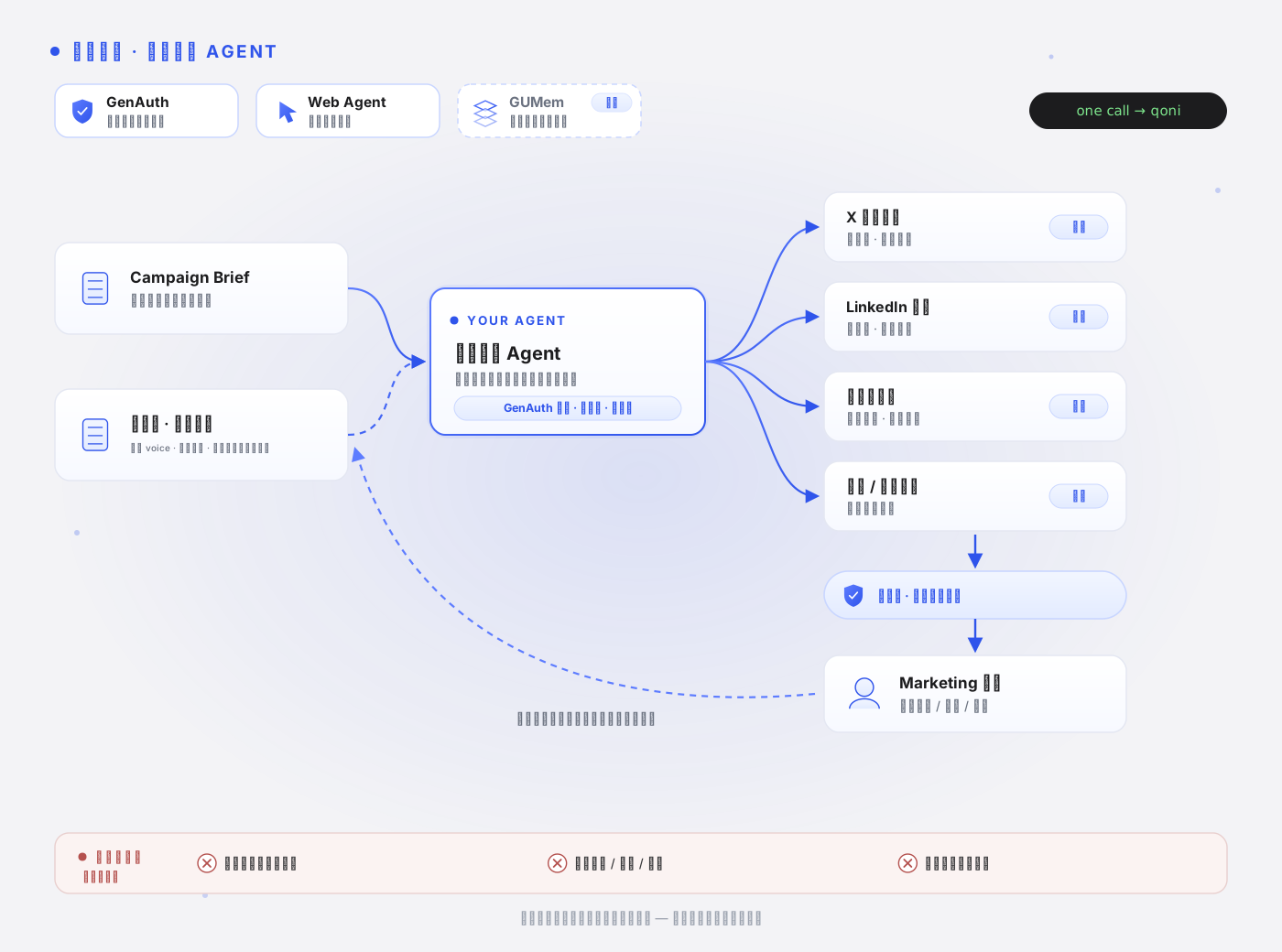
| GenAuth | 核心 | 社媒后台登录的交互式委托、撤销与审计链;发布与互动动作留在委托范围之外。 |
| Web Agent | 核心 | 受控会话登录社媒后台或 CMS(Profiles 可复用登录态),读取营销活动上下文与历史帖子,把草稿写入草稿箱。 |
| GUMem | 可选 | 仅保存用户明确确认的长期语气偏好(例如惯用的开场方式)。品牌 voice、平台规则、禁用表达属于版本化规则,放在你的规则库(policy store)里按版本注入;历史表现数据属于业务状态,放在你的 analytics 存储——都不属于 Memory。 |
权限与委托边界
Agent 本身不持有任何固有权限。每次草稿任务的实际权限是三个集合的交集:用户真实权限 ∩ 本次显式委托范围 ∩ 企业批准边界。落到这个场景:
- 委托范围只覆盖"读取历史帖子与营销活动资料、创建并更新草稿",不包含发布、评论、私信或批量互动。
- 委托凭证短时效,单次草稿任务建议分钟级有效期,过期后需重新委托。
- 用户或管理员可随时撤销授权;撤销后新的读取或建稿请求立即失败。
- 越权尝试(例如触发发布动作)会被拒绝并留痕——审计链覆盖全部尝试,不只是成功行为。
注意:本样例申请 doAnything 产品权限。域名清单、页面范围和动作白名单等业务边界需要由应用和下游服务配置、校验;产品 scope 和 prompt 中的规则不提供这些细粒度限制。本样例未展示该配置。授权语义见 Delegate Token 与缩权。
工作流程
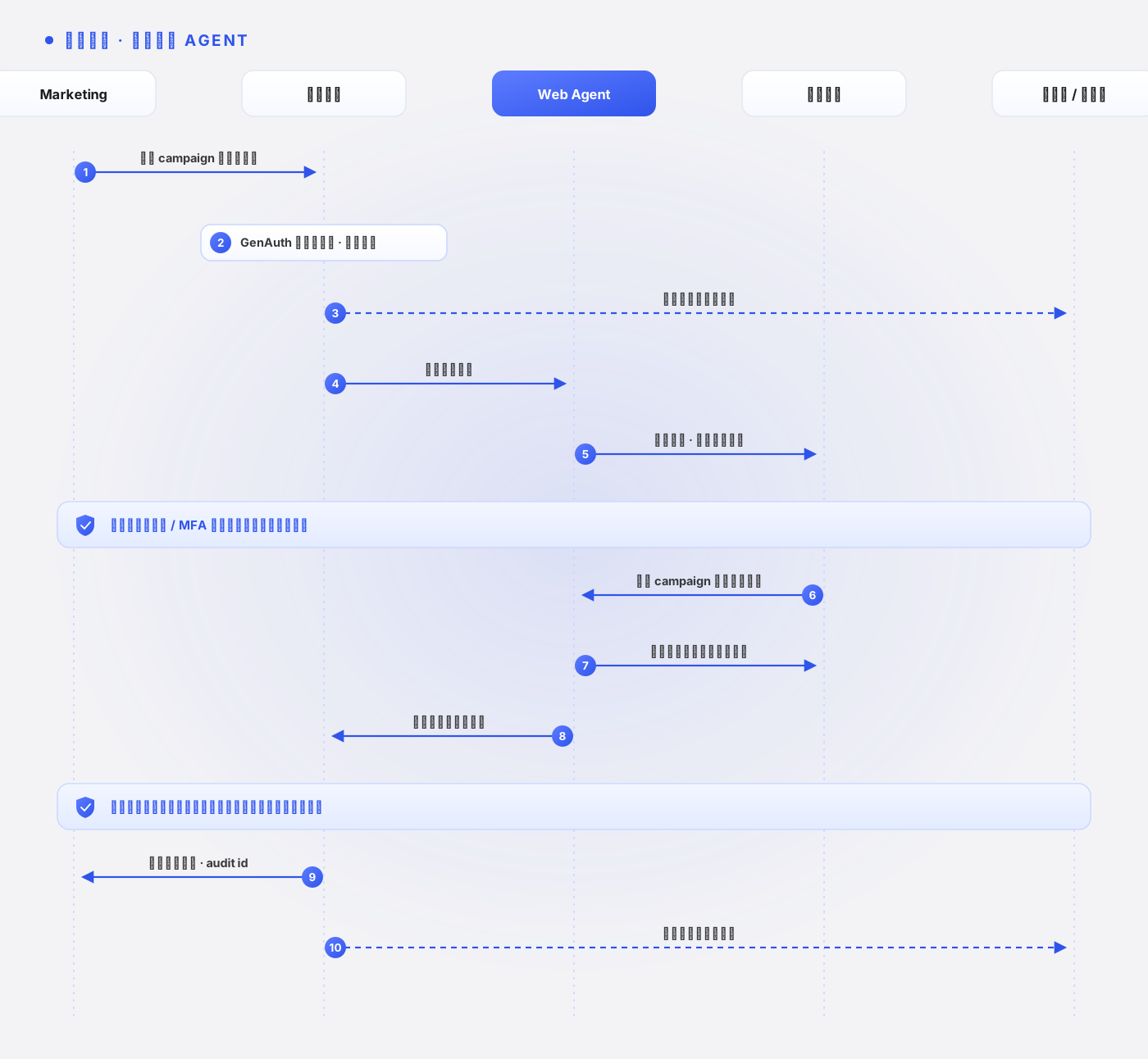
用户选择营销活动和目标渠道(X、LinkedIn、公众号、邮件等)。
GenAuth 发起交互式委托;用户在 Qoni Console 确认后,服务端回调兑换出最小权限凭证。
应用从规则库读取当前版本的品牌 voice、平台规则和禁用表达,注入任务描述。
Web Agent 打开社媒后台或 CMS;首次访问时用户在受控会话中完成登录,后续任务可通过 Profiles 复用登录态。
检查点:登录墙、验证码或风控页出现时,Web Agent 应升级给人处理,而不是静默绕过。
Web Agent 读取营销活动资料和历史帖子,按平台生成草稿,标注各平台在长度、语气和格式上的差异。
Web Agent 把草稿写入平台草稿箱,或返回给应用界面等待确认;输出附 audit id。
检查点:任何草稿都不应进入发布状态;后台界面上"保存草稿"与"发布"入口相邻时,该步骤应按风险动作过类型化关卡。
应用侧解析草稿输出并校验渠道标注;用户的采纳、修改和否决结果归档到你的内容库。
示例代码
本页使用已发布到 npm 的 @qoniai/qoni 0.9.0;下载包附带同版本 SDK,由 npm ci 安装。默认用 Firefox 产品页,为虚构推广活动生成 LinkedIn 和 X 两个渠道的文案。公开网页由真实 SDK 读取,业务输入在 scenarios.ts 中标记为 public-demo。
本演示不读取或写入 GUMem;任务输入来自页面清单和明确提供的业务数据。DoAnything 直接打开所给页面,按场景任务读取并形成输出。接入自己的数据时,用 --input 指定 JSON 文件;需要用户同意时用 --interactive 发起委托,站点登录与交互处理见 Qoni SDK。
下载完整可运行样例,或在文档仓库中执行:
cd examples/qoni
npm ci
npm run case -- social-media-draft-agent
# 使用自己的输入
npm run case -- social-media-draft-agent --input /path/to/input.json
运行前设置服务端 QONI_ACCESS_KEY、QONI_SECRET_KEY。QONI_USER_ID 可指定业务已识别的 GenAuth 用户;未指定时,本地演示从绑定用户池取用户。涉及演示 Memory 写入时,程序创建独立用户以避免修改业务用户的偏好。
本场景的真实执行入口:
import { cliOptions } from '../runtime.js'
import { inputFile, runScenario } from '../run-case.js'

// 按渠道要求和品牌语气生成社媒草稿。
const report = await runScenario('social-media-draft-agent', cliOptions(), inputFile())
// report.items:渠道、草稿和编辑说明,交运营复核后发布。
// 校验字段:channel, draft, notes.
console.log(JSON.stringify(report, null, 2))
入口按场景 ID 读取下面这段定义,代码直接引用实际执行的 scenarios.ts,注释按页面语言显示:任务描述、输出字段、来源字段、Web Search 查询(如有)、是否使用 Memory,以及演示输入。执行链会在任务描述后追加输入数据、搜索来源、召回的 Memory 和通用安全约束,拼成最终的任务描述,完整拼装逻辑见下方执行链。
// 按渠道要求和品牌语气生成社媒草稿。
browser('social-media-draft-agent',
  'Draft one short social post for each supplied channel about the cited product page. Return [{channel,draft,notes}]. Respect the supplied brand policy. Produce drafts only; do not publish, comment, message or interact with any social account.',
  ['channel','draft','notes'], undefined, sample([firefox], { campaignName: 'Demo Firefox introduction', channels: ['LinkedIn','X'] })),
这里的 runScenario()、browser()、research() 和 sample() 是样例包的应用函数。实际 SDK 调用都在下面的执行链中:委托与权限查询 → 所需的 Memory/搜索 → 网页任务或监控 → 校验与保存。fields、sourceField 规定本场景如何校验业务输出;它们由应用使用。辅助函数的完整实现在样例包的 runtime.ts 中。
查看实际 SDK 执行链
// 场景构造器:browser() 只调用 DoAnything;research() 先 Web Search 再 DoAnything;sample() 标记 public-demo 演示输入。
const firefox = 'https://www.mozilla.org/en-US/firefox/new/'
const manifesto = 'https://www.mozilla.org/en-US/about/manifesto/'
const privacy = 'https://www.mozilla.org/en-US/privacy/firefox/'
const support = 'https://support.mozilla.org/en-US/kb/get-started-firefox-overview-main-features'
// 演示文案规则会加入 prompt;它们不替代服务端权限或业务规则校验。
const policy = {
  version: 'demo-2026-09',
  approvedClaims: ['Describe only features supported by the cited page.'],
  forbiddenClaims: ['guaranteed security', '100% private', 'unverified pricing or performance'],
  voice: 'concise and warm',
}
const sample = (pages: string[], business: JsonObject = {}): JsonObject => ({
  dataset: 'public-demo', pages, policy, business,
  notice: 'Business records are synthetic demonstration inputs. Referenced websites and SDK execution are real.',
})
// fields 是必填输出字段;sourceField 指定需要校验 URL 格式的字段,memory 控制是否调用 GUMem。
const browser = (id: string, task: string, fields: string[], sourceField: string | undefined, input: JsonObject, memory = false): Scenario => ({
  id, products: ['doAnything'], task, fields, sourceField, input, memory,
})
const research = (id: string, task: string, fields: string[], sourceField: string, queries: string[], input: JsonObject, memory = false): Scenario => ({
  id, products: ['webSearch', 'doAnything'], task, fields, sourceField, queries, input, memory,
})import { QoniScopes, type JsonObject, type RunResult } from '@qoniai/qoni'
import { readFileSync } from 'node:fs'
import { getScenario, type Scenario } from './scenarios.js'
import { appendTrace, checkInputCoverage, cleanupDemoUser, createContext, delegate, handleInteraction, inputEntryCount, isolateDemoUser, object, readWithRetry, renderScreenshot,
save, saveArtifacts, searchHits, settled, settleRun, validateItems, withCleanup, type Context, type Options } from './runtime.js'
export async function runScenario(id: string, options: Options = {}, input?: JsonObject) {
// 按场景 ID 读取真实任务定义;--input 只替换业务输入。
const scenario = getScenario(id)
const data = input ?? scenario.input
if (scenario.memory && data.dataset !== 'public-demo' && options.mode !== 'interactive' && !options.userId && !process.env.QONI_USER_ID) {
throw new Error('Business Memory writes require the current QONI_USER_ID; do not select an arbitrary bound user')
}
const context = await createContext(id, { ...options,
skipUserResolution: scenario.memory && data.dataset === 'public-demo' })
return withCleanup(context, async register => {
register('isolated demonstration user', () => cleanupDemoUser(context))
// 演示偏好写入隔离用户;业务 Memory 必须属于明确识别的当前用户。
if (scenario.memory && data.dataset === 'public-demo') await isolateDemoUser(context)
return await executeScenario(context, scenario, data)
})
}
export async function executeScenario(context: Context, scenario: Scenario, input: JsonObject) {
const pages = input.pages
if (!Array.isArray(pages) || !pages.length || pages.some(page => typeof page !== 'string' || !/^https:\/\//.test(page))) {
throw new Error('Input pages must be an array of HTTPS URLs')
}
if (input.requiresLogin === true && context.mode !== 'interactive') {
throw new Error('Targets that require sign-in need --interactive and user-controlled login')
}
const memoryScopes = scenario.memory
? [QoniScopes.GUMEM_MEMORY_READ, QoniScopes.GUMEM_MEMORY_WRITE, QoniScopes.GUMEM_MESSAGE_WRITE] : []
// delegate() 是应用函数,内部调用 delegateToken / completeDelegateToken。
const grant = await delegate(context, scenario.id, scenario.products, memoryScopes)
// 查询实际授权范围;readWithRetry() 只对可重试的读取错误有限重试。
const { data: tokenInfo } = await readWithRetry(context, 'delegation introspection',
() => context.qoni.genauth.introspectDelegationToken({ token: grant.token }))
const info = object(tokenInfo)
if (info.active !== true) throw new Error('The delegation token is not active')
const audit = { grantId: grant.grantId, auditId: grant.auditId, scopes: info.scope }
let memory: unknown
if (scenario.memory) {
// Session 将本次对话关联到当前用户,sessionId 由应用生成。
const sessionId = `${scenario.id}-${Date.now()}`
await context.qoni.gumem.createSession({
token: grant.token, userId: context.userId, sessionId, title: scenario.id,
})
const preferences = object(input.business ?? {}).confirmedPreferences
if (Array.isArray(preferences) && preferences.length) {
// 只写入业务已经确认的偏好;sync: true 请求同步处理这次写入。
await context.qoni.gumem.addMessages({ token: grant.token, userId: context.userId, sessionId, sync: true,
messages: [{ role: 'user', content: `Confirmed demonstration preferences: ${preferences.join('; ')}` }] })
}
// 召回与任务有关的偏好,作为后续 prompt 的上下文。
memory = (await readWithRetry(context, 'GUMem recall', () => context.qoni.gumem.recall({ token: grant.token, sessionId,
query: 'Confirmed preferences relevant to this task', details: true }))).data
save(context, 'memory.json', { sessionId, context: memory })
if (Array.isArray(preferences) && preferences.length && !preferences.every(value => JSON.stringify(memory).includes(String(value)))) {
throw new Error('Recall did not include the confirmed preferences just written by this demo')
}
}
if (scenario.products.includes('track')) return runMonitor(context, scenario, input, grant.token, audit)
let hits: ReturnType<typeof searchHits> = []
if (scenario.queries) {
// Web Search 返回真实 results[];搜索来源将提供给 DoAnything 阅读。
const search = await context.qoni.webSearch.run({ token: grant.token, prompt: scenario.queries, maxResultsPerQuery: 3 })
save(context, 'search-ref.json', { runId: search.id, audit })
await withCleanup(context, async register => {
register('Web Search run', () => search.cancel('Documentation demonstration cleanup'))
const result = await settleRun(context, search)
save(context, 'search-result.json', result)
settled(result)
hits = searchHits(result.output)
})
}
// 逐项对应输入的场景按输入项数要求条数,其余场景最多两项。
const requiredItems = inputEntryCount(scenario.id, input)
// 拼装场景任务、业务输入、搜索来源和 Memory;这些都是应用约定的上下文。
const prompt = [scenario.task, `Task inputs: ${JSON.stringify(input)}`,
`Search sources: ${JSON.stringify(hits)}`, `Confirmed memory: ${JSON.stringify(memory ?? null)}`,
`Actual collection time: ${new Date().toISOString()}`,
requiredItems === undefined
? 'Inspect the supplied sources. Return at most two items in the requested JSON array, without prose or Markdown.'
: `Inspect the supplied sources. Return exactly ${requiredItems} item${requiredItems === 1 ? '' : 's'} in the requested JSON array, one per input entry, without prose or Markdown.`,
'Keep synthetic demonstration data identified as synthetic. Do not send messages, publish, pay, edit accounts or submit forms.',
input.requiresLogin === true ? 'Request user sign-in through an interaction when required; never enter credentials yourself.' : 'Public demonstration sources only; do not sign in.',
].join('\n\n')
// 使用同一委托启动 Agent;capture 接收服务端交付的截图,不保证每步都有图。
const run = await context.qoni.doAnything.run({ token: grant.token, prompt, capture: { screenshots: true } })
save(context, 'run-ref.json', { runId: run.id, session: run.sessionRef, audit })
let result: RunResult
const trace = (event: { type: string; data: unknown }) => {
context.eventCounts[event.type] = (context.eventCounts[event.type] ?? 0) + 1
if (['progress','message','done'].includes(event.type)) appendTrace(context, event)
if (event.type === 'browserLiveUrlChanged') {
const liveUrl = object(event.data).liveUrl
if (typeof liveUrl === 'string') context.browserUrl = liveUrl
}
}
return withCleanup(context, async register => {
register('DoAnything run', () => run.cancel('Documentation demonstration cleanup'))
if (context.delivery === 'events') {
// --events 实时读取事件;普通交互对象先转换为 SDK 句柄再交给用户处理。
for await (const event of run.events({ signal: AbortSignal.any([context.abort.signal, AbortSignal.timeout(context.timeoutMs)]) })) {
trace(event)
if (event.type === 'screenshot') renderScreenshot(context, event.image)
if (event.type === 'interaction') await handleInteraction(context, run.interactionHandle(event.data))
}
result = await settleRun(context, run)
} else {
// 回调模式在 wait 内接收同一次任务的事件;这里的辅助函数会保存图像和询问用户。
result = await settleRun(context, run, { onEvent: trace,
onScreenshot: (image, index) => renderScreenshot(context, image, index),
onInteraction: interaction => handleInteraction(context, interaction) })
}
save(context, 'result.json', result)
settled(result)
await saveArtifacts(context, result)
if (scenario.id === 'landing-page-audit-agent' && context.screenshots === 0) throw new Error('The landing-page audit did not deliver the requested screenshot')
// 应用校验必填字段和来源 URL 格式;事实准确性仍需业务复核。
const items = validateItems(result.output, scenario.fields, scenario.sourceField)
// 要求逐项对应输入的场景,再核对每个输入项都有对应输出。
checkInputCoverage(scenario.id, items, input)
const report = { scenario: scenario.id, dataset: input.dataset, passed: true, runId: run.id,
status: result.status, items, audit, screenshots: context.screenshots, interactions: context.interactions,
events: context.eventCounts, artifactIds: result.artifacts.map(artifact => artifact.id) }
save(context, 'report.json', report)
return report
})
}
async function runMonitor(context: Context, scenario: Scenario, input: JsonObject, token: string, audit: JsonObject) {
// Track 单独创建 monitor:声明目标、抽取字段并请求每小时调度。
const monitor = await context.qoni.track.create({ token, prompt: scenario.task,
targetUrls: input.pages, extractionSchema: { heading: 'string', source_url: 'string' },
tickInstructions: `Open the target URLs and read the actual visible heading. Return a JSON object with heading and source_url. ${scenario.task}`,
triggerDsl: { on: 'change' }, schedule: { kind: 'interval', intervalSeconds: 3600 } })
save(context, 'monitor-ref.json', { id: monitor.id, audit })
return withCleanup(context, async register => {
register('Track monitor', () => monitor.delete())
const definition = await monitor.get()
save(context, 'monitor-definition.json', definition)
if (object(definition.schedule).intervalSeconds !== 3600) throw new Error('Track did not persist the requested schedule interval')
// 立即运行一次,再读取该 runId 的实际抽取;completed 本身不足以证明取数成功。
const tick = await monitor.runNow()
save(context, 'tick.json', tick)
if (tick.state !== 'completed') throw new Error(`Track execution failed: ${tick.state} / ${tick.error ?? ''}`)
const runId = tick.runId
if (typeof runId !== 'string') throw new Error('Track tick did not return a runId')
const detail = await monitor.run(runId)
save(context, 'tick-detail.json', detail)
if (detail.state !== 'completed' || !detail.extracted || !Object.keys(object(detail.extracted)).length) {
throw new Error('Track did not extract page data')
}
const extracted = object(detail.extracted)
if (typeof extracted.heading !== 'string' || !extracted.heading.trim() ||
typeof extracted.source_url !== 'string' || !/^https:\/\//.test(extracted.source_url)) {
throw new Error('Track extraction is missing a heading or source URL')
}
const normalizeUrl = (value: string) => { const url = new URL(value); url.hash = ''; return url.href.replace(/\/$/, '') }
if (!(input.pages as string[]).some(url => normalizeUrl(url) === normalizeUrl(String(extracted.source_url)))) {
throw new Error('The Track source URL is not a configured target')
}
// 检查暂停/恢复是否保存;withCleanup() 在退出时调用 monitor.delete()。
await monitor.pause()
if ((await monitor.get()).status !== 'paused') throw new Error('Track did not persist the paused state')
await monitor.resume()
if ((await monitor.get()).status !== 'active') throw new Error('Track did not persist the active state')
const report = { scenario: scenario.id, dataset: input.dataset, passed: true, monitorId: monitor.id,
runId, state: detail.state, outcome: detail.outcome, extracted: detail.extracted, audit }
save(context, 'report.json', report)
return report
})
}
export function inputFile(): JsonObject | undefined {
const index = process.argv.indexOf('--input')
return index >= 0 ? object(JSON.parse(readFileSync(process.argv[index + 1], 'utf8'))) : undefined
}结果写入 output/social-media-draft-agent/report.json。report.items 包含渠道、草稿和编辑说明,交运营复核后发布,字段为 channel, draft, notes;audit 保存委托 ID、审计 ID 和实际授权范围,http.json 记录脱敏请求状态。应用解析 DoAnything 输出,并检查必填字段。内容判断仍需业务人员结合原始来源复核。
数据与记忆边界
这个场景涉及四类数据,只有最后一类属于 GUMem:
- 版本化规则:品牌 voice、平台规则、禁用表达——放在规则库(policy store)里按版本管理,草稿输出引用规则版本号。
- 业务状态:草稿、采纳与否决结果、历史帖子表现数据——归档到你的内容库和 analytics 存储,供复盘与追溯。
- 审计记录:
grantId与auditId构成的委托与行为链——由 GenAuth 维护。 - 用户 Memory(可选):仅保存用户明确确认的采纳、修改和否决结果沉淀出的长期语气偏好——这才是 GUMem 的位置;单次建稿默认不召回也不写回。
失败处理
| 情况 | 推荐处理 |
|---|---|
| 登录态失效 | 任务挂起,通知用户重新登录,从断点继续。 |
| 后台改版导致建稿失败 | 按失败处理并回放会话记录,没有证据证明写入成功就不算成功。 |
| 委托范围外的发布或互动请求 | 直接拒绝并记录,事后可在审计链中查到未遂动作。 |
| 输出草稿缺少渠道标注或含禁用表达 | 应用侧校验直接剔除该条草稿,并在交付物中说明剔除原因和依据的规则版本。 |
生产注意点
默认禁止自动发布、自动评论、自动私信或批量互动。草稿必须经过用户确认。对同一平台的建稿和读取频率应设置上限,避免触发平台风控;遇到风控或异常验证时升级给人处理,不尝试绕过。品牌规则更新后应在规则库中发布新版本,避免旧规则继续约束新草稿。