供应商监控智能体
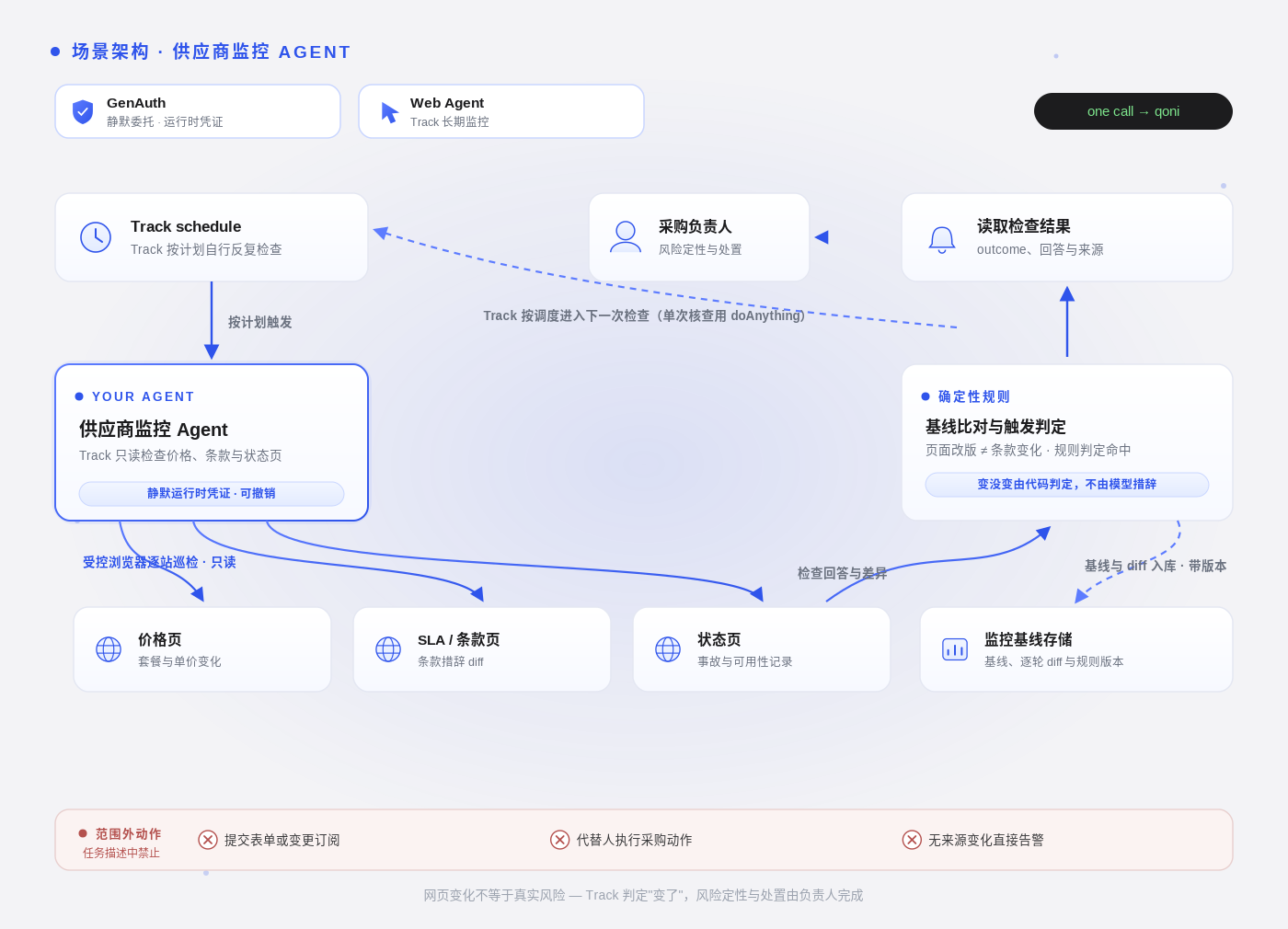
本页说明供应商监控智能体如何用 Track 对供应商价格页、SLA 与条款页和状态页做长期检查:首次检查建立基线,之后按调度计划反复检查、与上一次比较,有变化时由应用带着差异与来源通知负责人。读完本页,你能理解为什么这个场景的主轴是长期监控任务而不是记忆、基线和逐轮差异应该存在哪里,以及公开页监控为什么只需要静默签发的运行时凭证。
适用场景
采购、法务或安全团队需要持续关注供应商价格、服务条款、安全公告和产品变化。供应商很少主动通知这些更新:价格页悄悄调整、SLA 条款在改版中变更、状态页记录了未邮件通报的事故。人工定期巡检既占时间,又难以证明"上次检查时条款是什么样"。
典型触发时机:
- 合同续签前,需要确认供应商 SLA 和服务条款相对签约时有哪些变化。
- 供应商状态页出现事故记录,需要评估对自身业务的影响。
- 年度采购评审需要各供应商价格页的变化时间线作为谈判依据。
工程挑战
- 变化检测的信噪比:供应商页面经常改版,视觉与结构变化远多于实质变化。把"页面改版"误报成"条款变化",几轮之后负责人就不再看告警。
- 基线管理:判断"变没变"的前提是"上次是什么样"。基线需要带版本、可回放、可在改版后人工确认重建——散落在脚本本地的快照支撑不了续约谈判时的取证。
- 告警可信度:一条"SLA 从 99.9% 降到 99.5%"的告警必须能指回具体页面、具体段落差异和抓取时间;无来源的变化结论没有处置价值。
模块组合
| 模块 | 角色 | 说明 |
|---|---|---|
| GenAuth | 核心 | 运行时以静默委托签发短时效凭证(所有产品调用必需);本场景默认无需交互式确认,接入登录态或写动作时才升级 interactive,见下方"何时需要交互式确认"。 |
| Web Agent | 核心 | Track 保存长期检查任务:创建后立即做首次检查(first_look),之后按调度计划反复检查;每次检查给出 outcome(changed / same / needs_you)、headline 和 answer。一次性核查用 DoAnything。 |
| GUMem | 不使用 | 页面基线和逐轮差异是业务状态,不是用户记忆——放在你的监控基线存储里按版本管理(Track 只保留最近 50 次检查),Memory 不参与本场景。 |
何时需要交互式确认
所有产品调用都需要 GenAuth 委托令牌;公开只读场景用静默委托即可。本场景默认监控公开页面(价格页、公开条款页、状态页),不需要用户在 Console 交互确认:
- 公开读取:用
delegateToken静默签发运行时凭证即可。凭证短时效、可撤销,每次签发都进入审计链;Track 创建后由服务端按调度检查,停止监控用monitor.delete()。 - 登录态或写动作:只有当监控目标是供应商登录后台(例如合同价页、账单页),或需要在站点上执行任何写动作时,才切换到
mode: 'interactive',让负责人在 Qoni Console 确认授权。本页示例不包含这类目标。
注意:本样例申请 track 产品权限。供应商域名清单、页面范围等业务边界需要由应用和下游服务配置、校验;产品 scope 和 prompt 中的规则不提供这些细粒度限制。本样例未展示该配置。授权语义见 Delegate Token 与缩权。
工作流程
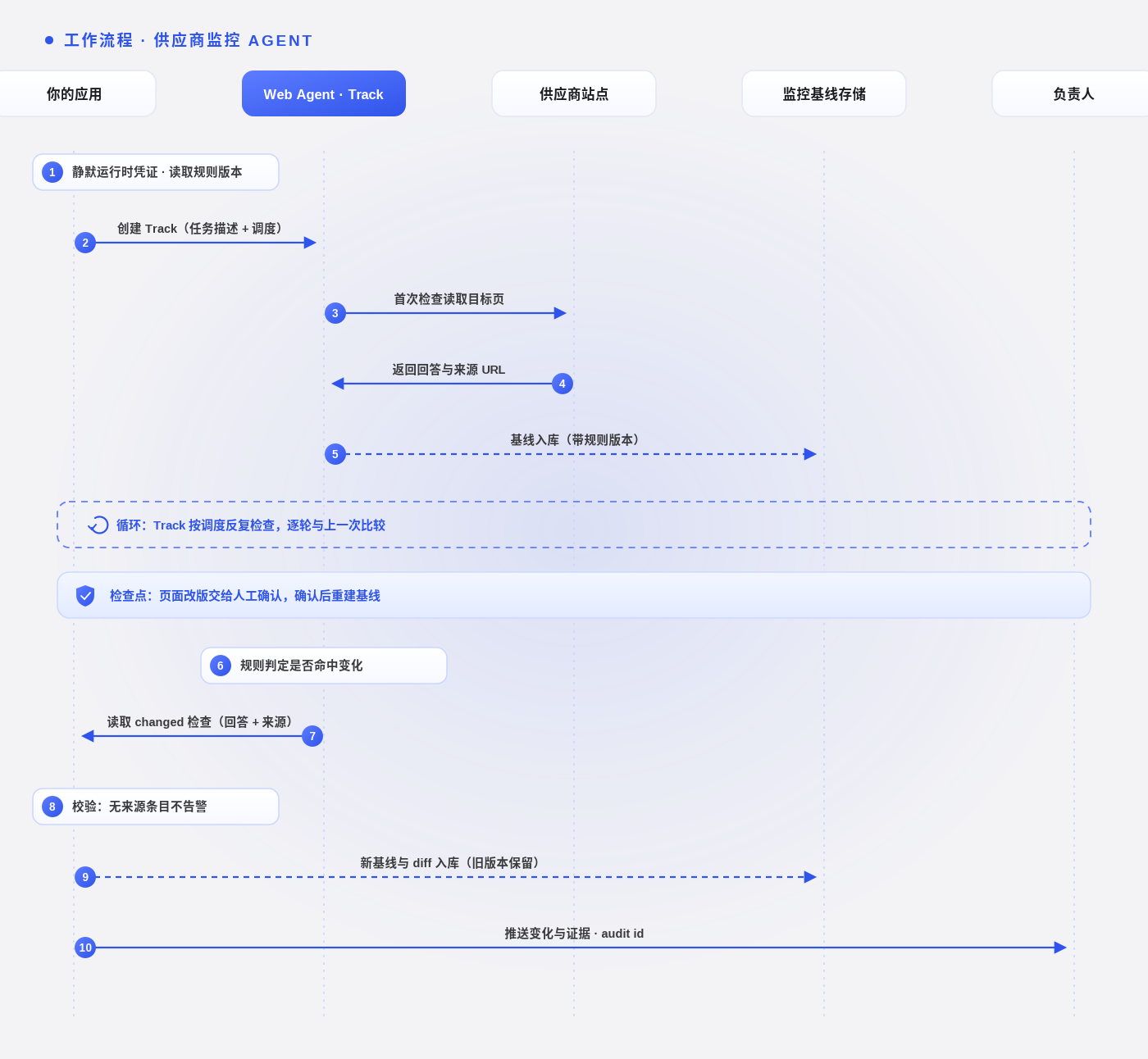
团队选择需要监控的供应商页面、关注段落和检查频率。
应用静默签发运行时凭证,并从监控规则库读取当前版本的监控规则。
应用创建 Track:把页面 URL、关注段落和判断变化的规则写进任务描述,调度用间隔(最短 600 秒)或每日定时。创建后立即开始首次检查(
first_look),它的回答就是之后比较的起点。之后每次按调度计划检查,Track 在同一个会话里重读页面、与上一次比较,给出
outcome、headline和answer;变没变按任务描述里的规则判断。检查点:页面整体改版时,
answer通常会说明结构变了。把这类changed交给人工确认,确认后在你的存储里重建基线,不把改版当成条款变化。应用读取检查结果:
monitor.events()实时看检查过程,monitor.runs()读最近 50 次检查,qoni.notifications.list()读 Track 留下的发现。应用校验
changed的检查(answer里没有来源 URL 的不告警),把新基线与差异写入监控基线存储,并通知负责人。检查点:每条告警都应能回溯到具体段落差异与来源页面;风险定性和处置由负责人完成,Agent 不直接给高风险定论。
示例代码
检查回答
只有检查状态是 done、回答里的 JSON 带着标题和来源 URL,应用才应记录成功。状态是 done 但回答里缺少这两项时,样例会报错;请核对目标页面和任务描述。
本页使用已发布到 npm 的 @qoniai/qoni 0.10.1;下载包附带同版本 SDK,由 npm ci 安装。默认检查 Firefox 公开产品页的标题;供应商规则版本是演示值 demo-v1。公开网页由真实 SDK 读取,业务输入在 scenarios.ts 中标记为 public-demo。
本场景创建 Track、等首次检查结束、核对检查回答并检查暂停/恢复,结束后删除 Track。本示例不覆盖长期调度和变化通知。接入自己的数据时,用 --input 指定 JSON 文件;需要用户同意时用 --interactive 发起委托,站点登录与交互处理见 Qoni SDK。
下载完整可运行样例,或在文档仓库中执行:
cd examples/qoni
npm ci
npm run case -- vendor-monitor-agent
# 使用自己的输入
npm run case -- vendor-monitor-agent --input /path/to/input.json
运行前设置服务端 QONI_ACCESS_KEY、QONI_SECRET_KEY。QONI_USER_ID 可指定业务已识别的 GenAuth 用户;未指定时,本地演示从绑定用户池取用户。涉及演示 Memory 写入时,程序创建独立用户以避免修改业务用户的偏好。
本场景的真实执行入口:
import { cliOptions } from '../runtime.js'
import { inputFile, runScenario } from '../run-case.js'

// 创建公开页面监控,并验证首次抽取、暂停和恢复。
const report = await runScenario('vendor-monitor-agent', cliOptions(), inputFile())
// report.extracted:monitor ID、运行 ID、标题和来源;本演示结束时会删除 monitor。
// 校验字段:heading, source_url.
console.log(JSON.stringify(report, null, 2))
入口按场景 ID 读取下面这段定义,代码直接引用实际执行的 scenarios.ts,注释按页面语言显示:任务描述、输出字段、来源字段、Web Search 查询(如有)、是否使用 Memory,以及演示输入。执行链会在任务描述后追加输入数据、搜索来源、召回的 Memory 和通用安全约束,拼成最终的任务描述,完整拼装逻辑见下方执行链。
// 创建公开页面监控,并验证首次抽取、暂停和恢复。
{ id:'vendor-monitor-agent', products:['track'], task:'Monitor the supplied public vendor page for heading changes. Extract heading and source_url. Report evidence and changes without placing orders, submitting forms or changing any vendor account.', fields:[], input:sample([firefox], { policyVersion:'demo-v1',watchedSections:['heading'] }) },
这里的 runScenario()、browser()、research() 和 sample() 是样例包的应用函数。实际 SDK 调用都在下面的执行链中:委托与权限查询 → 所需的 Memory/搜索 → 网页任务或监控 → 校验与保存。fields、sourceField 规定本场景如何校验业务输出;它们由应用使用。辅助函数的完整实现在样例包的 runtime.ts 中。
查看实际 SDK 执行链
// 场景构造器:browser() 只调用 DoAnything;research() 先 Web Search 再 DoAnything;sample() 标记 public-demo 演示输入。
const firefox = 'https://www.mozilla.org/en-US/firefox/new/'
const manifesto = 'https://www.mozilla.org/en-US/about/manifesto/'
const privacy = 'https://www.mozilla.org/en-US/privacy/firefox/'
const support = 'https://support.mozilla.org/en-US/kb/get-started-firefox-overview-main-features'
// 演示文案规则会加入 prompt;它们不替代服务端权限或业务规则校验。
const policy = {
  version: 'demo-2026-09',
  approvedClaims: ['Describe only features supported by the cited page.'],
  forbiddenClaims: ['guaranteed security', '100% private', 'unverified pricing or performance'],
  voice: 'concise and warm',
}
const sample = (pages: string[], business: JsonObject = {}): JsonObject => ({
  dataset: 'public-demo', pages, policy, business,
  notice: 'Business records are synthetic demonstration inputs. Referenced websites and SDK execution are real.',
})
// fields 是必填输出字段;sourceField 指定需要校验 URL 格式的字段,memory 控制是否调用 GUMem。
const browser = (id: string, task: string, fields: string[], sourceField: string | undefined, input: JsonObject, memory = false): Scenario => ({
  id, products: ['doAnything'], task, fields, sourceField, input, memory,
})
const research = (id: string, task: string, fields: string[], sourceField: string, queries: string[], input: JsonObject, memory = false): Scenario => ({
  id, products: ['webSearch', 'doAnything'], task, fields, sourceField, queries, input, memory,
})import { QoniScopes, type JsonObject, type RunResult } from '@qoniai/qoni'
import { readFileSync } from 'node:fs'
import { getScenario, type Scenario } from './scenarios.js'
import { appendTrace, checkInputCoverage, cleanupDemoUser, createContext, delegate, handleInteraction, inputEntryCount, isolateDemoUser, object, parseJsonOutput, readWithRetry,
save, saveArtifacts, searchHits, settled, settleRun, validateItems, withCleanup, type Context, type Options } from './runtime.js'
export async function runScenario(id: string, options: Options = {}, input?: JsonObject) {
// 按场景 ID 读取真实任务定义;--input 只替换业务输入。
const scenario = getScenario(id)
const data = input ?? scenario.input
if (scenario.memory && data.dataset !== 'public-demo' && options.mode !== 'interactive' && !options.userId && !process.env.QONI_USER_ID) {
throw new Error('Business Memory writes require the current QONI_USER_ID; do not select an arbitrary bound user')
}
const context = await createContext(id, { ...options,
skipUserResolution: scenario.memory && data.dataset === 'public-demo' })
return withCleanup(context, async register => {
register('isolated demonstration user', () => cleanupDemoUser(context))
// 演示偏好写入隔离用户;业务 Memory 必须属于明确识别的当前用户。
if (scenario.memory && data.dataset === 'public-demo') await isolateDemoUser(context)
return await executeScenario(context, scenario, data)
})
}
export async function executeScenario(context: Context, scenario: Scenario, input: JsonObject) {
const pages = input.pages
if (!Array.isArray(pages) || !pages.length || pages.some(page => typeof page !== 'string' || !/^https:\/\//.test(page))) {
throw new Error('Input pages must be an array of HTTPS URLs')
}
if (input.requiresLogin === true && context.mode !== 'interactive') {
throw new Error('Targets that require sign-in need --interactive and user-controlled login')
}
const memoryScopes = scenario.memory
? [QoniScopes.GUMEM_MEMORY_READ, QoniScopes.GUMEM_MEMORY_WRITE, QoniScopes.GUMEM_MESSAGE_WRITE] : []
// delegate() 是应用函数,内部调用 delegateToken / completeDelegateToken。
const grant = await delegate(context, scenario.id, scenario.products, memoryScopes)
// 查询实际授权范围;readWithRetry() 只对可重试的读取错误有限重试。
const { data: tokenInfo } = await readWithRetry(context, 'delegation introspection',
() => context.qoni.genauth.introspectDelegationToken({ token: grant.token }))
const info = object(tokenInfo)
if (info.active !== true) throw new Error('The delegation token is not active')
const audit = { grantId: grant.grantId, auditId: grant.auditId, scopes: info.scope }
let memory: unknown
if (scenario.memory) {
// Session 将本次对话关联到当前用户,sessionId 由应用生成。
const sessionId = `${scenario.id}-${Date.now()}`
await context.qoni.gumem.createSession({
token: grant.token, userId: context.userId, sessionId, title: scenario.id,
})
const preferences = object(input.business ?? {}).confirmedPreferences
if (Array.isArray(preferences) && preferences.length) {
// 只写入业务已经确认的偏好;sync: true 请求同步处理这次写入。
await context.qoni.gumem.addMessages({ token: grant.token, userId: context.userId, sessionId, sync: true,
messages: [{ role: 'user', content: `Confirmed demonstration preferences: ${preferences.join('; ')}` }] })
}
// 召回与任务有关的偏好,作为后续 prompt 的上下文。
memory = (await readWithRetry(context, 'GUMem recall', () => context.qoni.gumem.recall({ token: grant.token, sessionId,
query: 'Confirmed preferences relevant to this task', details: true }))).data
save(context, 'memory.json', { sessionId, context: memory })
if (Array.isArray(preferences) && preferences.length && !preferences.every(value => JSON.stringify(memory).includes(String(value)))) {
throw new Error('Recall did not include the confirmed preferences just written by this demo')
}
}
if (scenario.products.includes('track')) return runMonitor(context, scenario, input, grant.token, audit)
let hits: ReturnType<typeof searchHits> = []
if (scenario.queries) {
// Web Search 返回真实 results[];搜索来源将提供给 DoAnything 阅读。
const search = await context.qoni.webSearch.run({ token: grant.token, prompt: scenario.queries, maxResultsPerQuery: 3 })
save(context, 'search-ref.json', { runId: search.id, audit })
await withCleanup(context, async register => {
register('Web Search run', () => search.cancel('Documentation demonstration cleanup'))
const result = await settleRun(context, search)
save(context, 'search-result.json', result)
settled(result)
hits = searchHits(result.output)
})
}
// 逐项对应输入的场景按输入项数要求条数,其余场景最多两项。
const requiredItems = inputEntryCount(scenario.id, input)
// 拼装场景任务、业务输入、搜索来源和 Memory;这些都是应用约定的上下文。
const prompt = [scenario.task, `Task inputs: ${JSON.stringify(input)}`,
`Search sources: ${JSON.stringify(hits)}`, `Confirmed memory: ${JSON.stringify(memory ?? null)}`,
`Actual collection time: ${new Date().toISOString()}`,
requiredItems === undefined
? 'Inspect the supplied sources. Return at most two items in the requested JSON array, without prose or Markdown.'
: `Inspect the supplied sources. Return exactly ${requiredItems} item${requiredItems === 1 ? '' : 's'} in the requested JSON array, one per input entry, without prose or Markdown.`,
'Keep synthetic demonstration data identified as synthetic. Do not send messages, publish, pay, edit accounts or submit forms.',
input.requiresLogin === true ? 'Request user sign-in through an interaction when required; never enter credentials yourself.' : 'Public demonstration sources only; do not sign in.',
].join('\n\n')
// 使用同一委托启动 Agent。
const run = await context.qoni.doAnything.run({ token: grant.token, prompt })
save(context, 'run-ref.json', { runId: run.id, session: run.sessionRef, audit })
let result: RunResult
const trace = (event: { type: string; data: unknown }) => {
context.eventCounts[event.type] = (context.eventCounts[event.type] ?? 0) + 1
if (['progress','message','done'].includes(event.type)) appendTrace(context, event)
if (event.type === 'browserLiveUrlChanged') {
const liveUrl = object(event.data).liveUrl
if (typeof liveUrl === 'string') context.browserUrl = liveUrl
}
}
return withCleanup(context, async register => {
register('DoAnything run', () => run.cancel('Documentation demonstration cleanup'))
if (context.delivery === 'events') {
// --events 实时读取事件;普通交互对象先转换为 SDK 句柄再交给用户处理。
for await (const event of run.events({ signal: AbortSignal.any([context.abort.signal, AbortSignal.timeout(context.timeoutMs)]) })) {
trace(event)
if (event.type === 'interaction') await handleInteraction(context, run.interactionHandle(event.data))
}
result = await settleRun(context, run)
} else {
// 回调模式在 wait 内接收同一次任务的事件;这里的辅助函数会询问用户。
result = await settleRun(context, run, { onEvent: trace,
onInteraction: interaction => handleInteraction(context, interaction) })
}
save(context, 'result.json', result)
settled(result)
await saveArtifacts(context, result)
if (scenario.id === 'landing-page-audit-agent' && context.screenshots === 0) throw new Error('The landing-page audit did not deliver the requested screenshot')
// 应用校验必填字段和来源 URL 格式;事实准确性仍需业务复核。
const items = validateItems(result.output, scenario.fields, scenario.sourceField)
// 要求逐项对应输入的场景,再核对每个输入项都有对应输出。
checkInputCoverage(scenario.id, items, input)
const report = { scenario: scenario.id, dataset: input.dataset, passed: true, runId: run.id,
status: result.status, items, audit, screenshots: context.screenshots, interactions: context.interactions,
events: context.eventCounts, artifactIds: result.artifacts.map(artifact => artifact.id) }
save(context, 'report.json', report)
return report
})
}
async function runMonitor(context: Context, scenario: Scenario, input: JsonObject, token: string, audit: JsonObject) {
// Track 由一段任务描述创建:要看的页面写进 prompt,每小时检查一次;创建后立刻开始首次检查(first_look)。
const pages = input.pages as string[]
const monitor = await context.qoni.track.create({ token, title: scenario.id,
prompt: `${scenario.task}\nPages: ${pages.join(' ')}\nAnswer with one JSON object {"heading": string, "source_url": string} for the page you read.`,
schedule: { kind: 'interval', intervalSeconds: 3600 } })
save(context, 'monitor-ref.json', { id: monitor.id, audit })
return withCleanup(context, async register => {
register('Track monitor', () => monitor.delete())
const definition = await monitor.get()
save(context, 'monitor-definition.json', definition)
if (object(definition.schedule).intervalSeconds !== 3600) throw new Error('Track did not persist the requested schedule interval')
// 按创建时记下的 lastTaskId 等首次检查结束;检查进行中不另发 runNow(会返回 409 task_in_progress)。
const runId = definition.lastTaskId
if (typeof runId !== 'string' || !runId) throw new Error('Track did not start its first check')
const check = await waitForCheck(() => monitor.run(runId))
save(context, 'check.json', check)
if (check.status !== 'done') throw new Error(`Track check ended as ${String(check.status)}: ${String(check.failure ?? '')}`)
const extracted = object(parseJsonOutput(check.answer))
if (typeof extracted.heading !== 'string' || !extracted.heading.trim() ||
typeof extracted.source_url !== 'string' || !/^https:\/\//.test(extracted.source_url)) {
throw new Error('The Track check is missing a heading or source URL')
}
const normalizeUrl = (value: string) => { const url = new URL(value); url.hash = ''; return url.href.replace(/\/$/, '') }
if (!pages.some(url => normalizeUrl(url) === normalizeUrl(String(extracted.source_url)))) {
throw new Error('The Track source URL is not a configured target')
}
// 检查暂停/恢复是否保存;withCleanup() 在退出时调用 monitor.delete()。
await monitor.pause()
if ((await monitor.get()).status !== 'paused') throw new Error('Track did not persist the paused state')
await monitor.resume()
if ((await monitor.get()).status !== 'active') throw new Error('Track did not persist the active state')
const report = { scenario: scenario.id, dataset: input.dataset, passed: true, monitorId: monitor.id,
runId, status: check.status, outcome: check.outcome, extracted, audit }
save(context, 'report.json', report)
return report
})
}
// 每 3 秒读一次这次检查,直到 done / failed / expired / canceled;最多等 5 分钟。
async function waitForCheck(read: () => Promise<JsonObject>): Promise<JsonObject> {
const deadline = Date.now() + 300_000
for (;;) {
const check = await read()
if (['done', 'failed', 'expired', 'canceled'].includes(String(check.status))) return check
if (Date.now() > deadline) throw new Error(`Track check did not finish within 5 minutes (status ${String(check.status)})`)
await new Promise(resolve => setTimeout(resolve, 3000))
}
}
export function inputFile(): JsonObject | undefined {
const index = process.argv.indexOf('--input')
return index >= 0 ? object(JSON.parse(readFileSync(process.argv[index + 1], 'utf8'))) : undefined
}首次检查通过后,output/vendor-monitor-agent/report.json 保存 Track ID、首次检查的 run ID、检查结果与授权范围,http.json 记录脱敏的请求状态。即使检查是 done,回答里没有标题或来源也会报错;此时应核对目标页面和任务描述再重跑,不能把空结果视为跑通。
数据与记忆边界
这个场景涉及四类数据,没有一类属于 GUMem:
- 版本化规则:监控段落清单、触发阈值、告警升级规则——放在监控规则库里按版本管理,每条告警引用规则版本号。
- 业务状态:页面基线、逐轮差异——由你的监控基线存储承载,带版本、可回放;Track 只保留最近 50 次检查。
- 审计记录:凭证签发构成的行为链——由 GenAuth 维护。
- 用户 Memory:本场景不使用 GUMem。基线与差异是业务状态而不是用户偏好;写进 Memory 只会制造第二份无法对账的真相。
失败处理
| 情况 | 推荐处理 |
|---|---|
| 页面整体改版 | 把这次 changed 交给人工确认,确认后重建基线,不把改版误报为条款变化。 |
| 连续 3 次检查没有产出报告 | Track 自动暂停;读回状态和 failure,修复目标页或任务描述后再 resume()。 |
| 目标页面出现登录墙或验证码 | 检查结果是 needs_you;Track 没有问询接口,由负责人用一次 DoAnything 任务处理(登录或接管),不静默绕过。 |
手动检查返回 409 task_in_progress | 上一次检查还在跑,按原 run ID 读回状态,不自动重试。 |
| 检查回答缺少差异或来源 | 应用侧校验直接丢弃该条目并记录丢弃数量;无来源不告警。 |
生产注意点
网页变化不等于真实风险:Track 判定"变了",风险定性与处置始终由负责人完成。监控只读、只通知,不代替人执行合同或采购动作。调度间隔应结合页面更新频率设置,不低于 600 秒,避免对供应商站点造成压力。Track 属于创建它的用户,每个用户最多保留 20 个;负责人变动时,在新负责人名下重新创建 Track,再删除旧的。
下一步
- 阅读 Track 了解 Track 的完整生命周期、检查记录与实时事件。
- 阅读 快速开始 跑通 Agent 身份与委托的最短路径。
- 继续查看 合作伙伴门户监控智能体 了解登录态下的相邻监控场景。